In the quest for faster websites, image optimization is essential. Squoosh.app, an open-source web app from the Google Chrome team, offers a powerful, privacy-first solution that runs entirely in your browser. This guide covers everything you need to know about Squoosh, from its core features and benefits to a practical step-by-step tutorial and honest comparison with other tools.
What Makes Squoosh Stand Out?
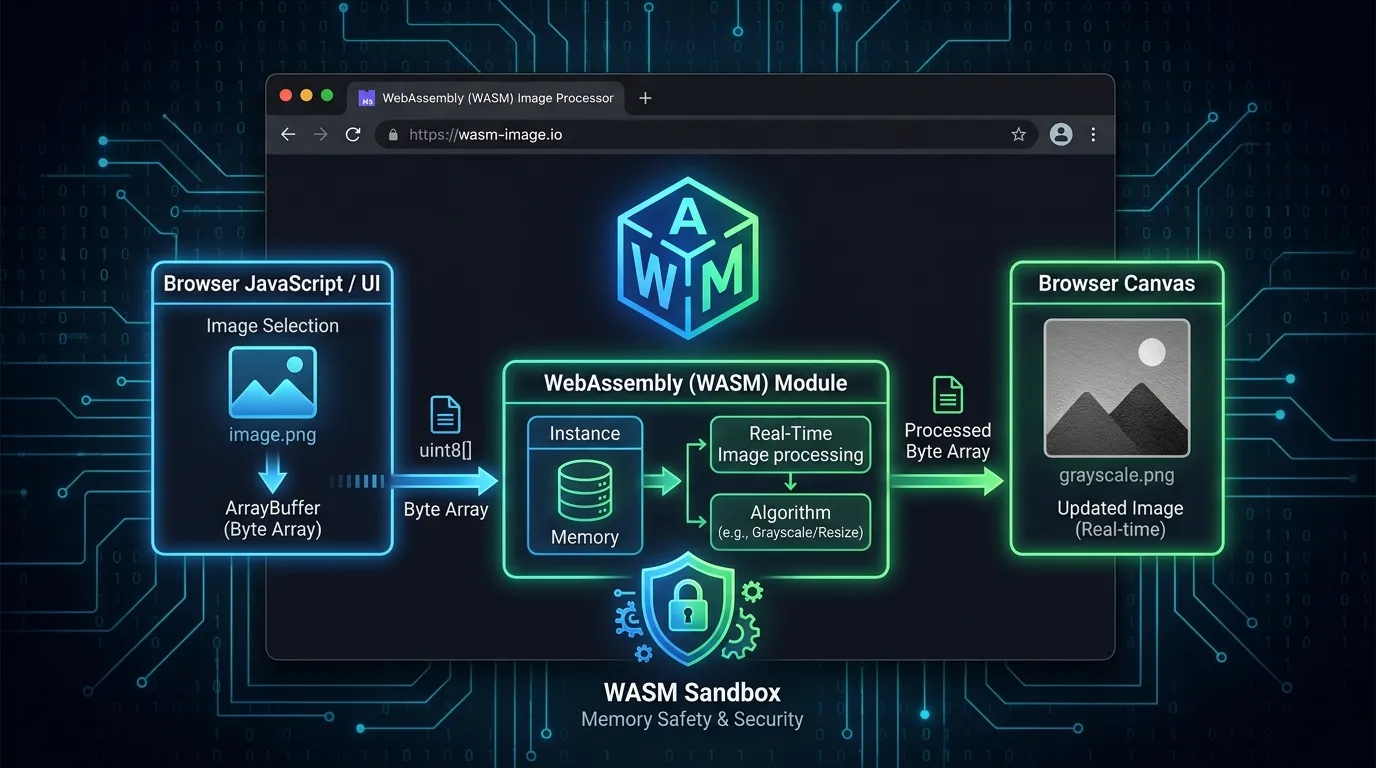
Unlike many online image compressors that require uploading files to a server, Squoosh processes everything locally on your device. It uses WebAssembly to run complex compression codecs (like MozJPEG and AVIF) directly in your browser’s sandbox. This means your images never leave your computer, making it exceptionally secure for sensitive or pre-release content.
This local processing enables one of its most praised features: real-time, side-by-side comparison. As you adjust settings, you can instantly see the visual impact on the image alongside the original, with the new file size shown live.
What Are the Key Features of Squoosh?
Squoosh packs a punch for a free, browser-based tool. Its main features are:
- Extensive Format Support: Compress to a wide array of modern and classic formats including WebP, AVIF, JPEG XL, MozJPEG, OxiPNG, and QOI.
- Flexible Controls: Adjust output with sliders for quality, compression effort, and image resizing. For expert users, advanced options like chroma subsampling are available.
- Real-time Preview: An interactive slider lets you compare the original and compressed versions side-by-side, with the new file size shown live. This visual feedback helps you balance file size and quality.
- Presets & Workflow: Save your favorite settings as a preset to speed up your workflow on subsequent images.
- Offline Capability: As a Progressive Web App (PWA), Squoosh works offline after the initial load.
How to Use Squoosh in 30 Seconds
Squoosh is incredibly easy to use. Here’s how to get started in 30 seconds:
- Navigate to the app: Go to
squoosh.app. - Load your image: Click the upload area or simply drag and drop your image into the browser window.
- Choose your format: On the right-hand control panel, select your desired output format (e.g., WebP, AVIF).
- Adjust quality: Use the Quality slider to find the sweet spot between file size and visual quality. Move the central slider to compare the original and compressed versions.
- Resize (optional): Toggle the Resize option and enter your desired dimensions. Ensure “Maintain Aspect Ratio” is checked to avoid distortion.
- Download: Click the blue download button in the bottom-right corner to save your optimized image.
Advanced Tips & Best Settings
- For photographs: Use WebP or AVIF with a quality setting between 75-85. You’ll often see significant savings over JPEG.
- For screenshots or graphics with text: Use OxiPNG (lossless) or WebP (lossless) to keep text crisp. The “Reduce Palette” option works well for simple graphics.
- Use the “Effort” slider: Crank this up for long-term images. It takes longer to process but can squeeze out a few extra kilobytes.
Who Is Squoosh Best Suited For?
- Web developers and designers: For optimizing hero images, product photos, and graphics to boost page load times and Core Web Vitals.
- Content creators and bloggers: For quick, high-quality compression of images for social media, email, and blog posts.
- Privacy-conscious users: Anyone handling sensitive images that should not be uploaded to a third-party server.
How Does Squoosh Perform in Real-World Use Cases?
The primary use case for Squoosh is preparing images for the web. A developer can take a 658 KB JPEG background image and, by converting it to WebP at default settings, see a roughly 63% reduction to about 244 KB. By carefully adjusting the quality slider, they can get it down to around 113 KB with minimal visible loss. Resizing the image by 50% can further reduce the file size to approximately 34 KB.
This kind of reduction can significantly improve page load times, especially on mobile, and is a perfect first step before implementing lazy loading for images below the fold.
How Does Squoosh Compare with Other Compressors?
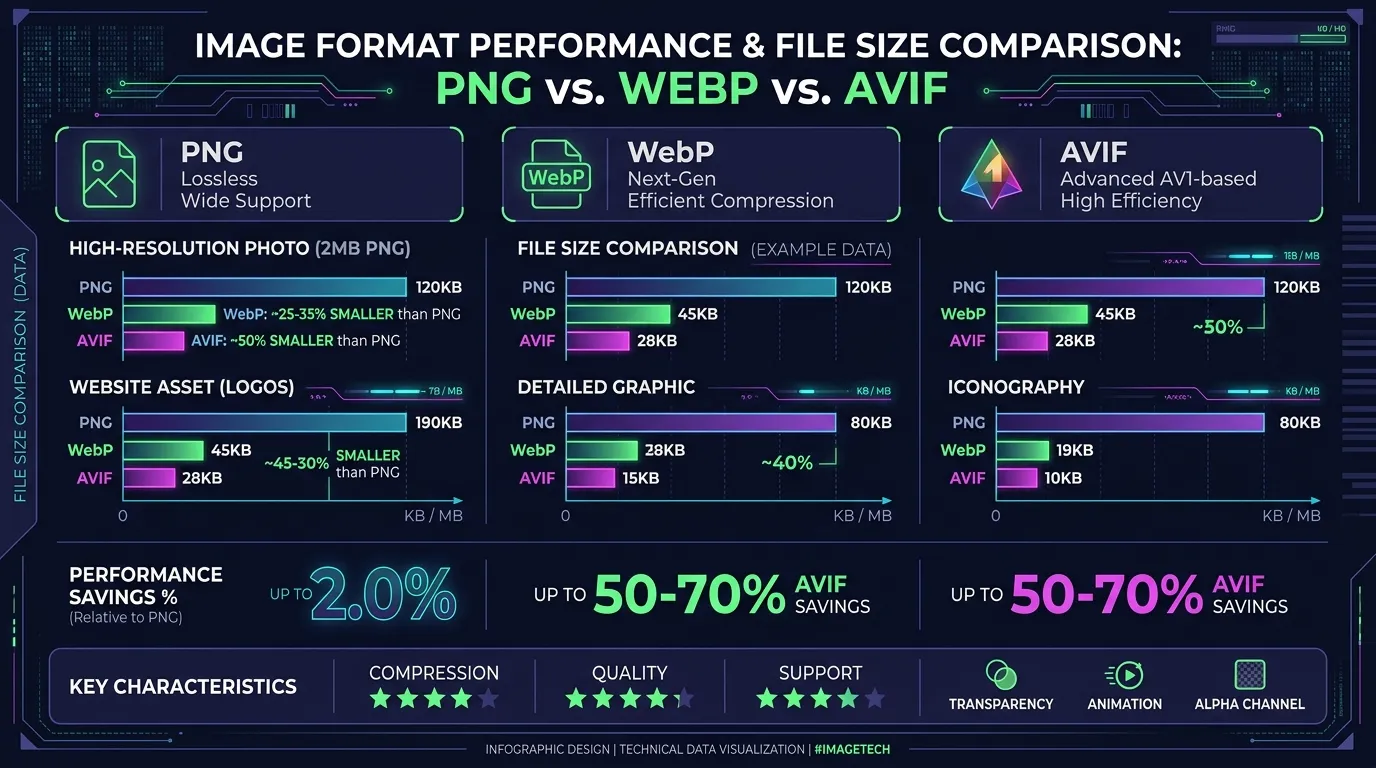
How does Squoosh stack up against other free image optimizers? Here’s a quick comparison based on key factors:
| Tool | Processing | Batch Processing | Modern Formats | Privacy |
|---|---|---|---|---|
| Squoosh | Client-side (Browser) | ❌ | ✅ AVIF, WebP, JXL | Highest (Local) |
| TinyPNG | Server-side | ✅ | WebP | Moderate |
| Optimizilla | Server-side | ✅ | ❌ | Low |
| Compresso | Client-side (Browser) | ✅ | WebP | Highest (Local) |
The Verdict: Choose Squoosh when you need fine-grained control over a single image’s quality and format, or when privacy is paramount. Choose TinyPNG for bulk optimization where privacy is less of a concern. Compresso is a great alternative if you need batch processing with the privacy of local processing.
Frequently Asked Questions
Can I run Squoosh offline?
Yes. Squoosh is built as a Progressive Web App (PWA). Once you visit the site once, the assets are cached, so you can use all compression codecs completely offline without internet.
Does Squoosh store my images on a server?
No. All compression runs locally on your CPU/GPU using WebAssembly binaries inside your browser’s sandbox.
What are the limits of Squoosh?
The primary limitation is the lack of bulk or batch processing in the web interface; each image must be optimized and downloaded individually.
Related Guides
- iScreen Suite: Open-Source Browser Customization & Productivity — Complete suite guide to new tab dashboards and wallpaper caching engines.
- iScreen Wallpapers & Provider Caching Engine — Learn how iScreen caches high-res WebP wallpapers without introducing load latency.