WebAssembly (Wasm) is a binary instruction format that runs at near-native speed inside a memory-safe sandbox, in the browser, at the edge, or on a server, and it’s no longer a research curiosity. Cloudflare Workers, Fastly Compute, Figma, and Visual Studio Code all ship it in production today. This piece walks through what Wasm actually is, how the sandbox works, how WASI extends it outside the browser, and a concrete framework for deciding when compiling to Wasm is worth the build complexity versus just shipping JavaScript.
Prerequisites
Before you start, you’ll want:
- Basic familiarity with JavaScript/TypeScript and the browser’s module system.
- Rust and Cargo installed (v1.70+) if you plan to follow the compile examples.
wasm-packinstalled (cargo install wasm-pack) for the Rust-to-Wasm build step.- A rough sense of what a CDN edge network does; helps when we get to Cloudflare Workers and Fastly Compute.
- No prior Wasm experience required. We build the mental model from scratch below.
What Is WebAssembly, and Why Does It Matter in 2026?
WebAssembly is a low-level, stack-based binary instruction format designed as a portable compilation target for languages like C, C++, Rust, Go, and increasingly Kotlin and Swift. A .wasm binary is not JavaScript and it doesn’t try to replace it. It’s a separate execution unit that a JS host loads, instantiates, and calls into, sharing a slice of linear memory for data exchange.
The core pitch has stayed consistent since the MVP shipped across major browsers back in 2017: predictable, near-native execution speed, a compact binary format that parses faster than JavaScript source, and a sandbox strict enough that browser vendors trust it to run untrusted code from the open web.
What’s changed by 2026 is the scope of what that sandbox can do. According to the official WebAssembly specification repository, version 3.0 was published as a Candidate Recommendation Draft on July 28, 2026, folding in features that used to be “advanced proposals”: a full garbage-collection type system, 64-bit linear memory addressing, structured exception handling (try_table/throw/catch), and tail calls. The W3C’s WebAssembly Core Specification tracks the same lineage. Practically, this means languages with their own GC (Kotlin, Dart, increasingly parts of the JVM ecosystem) can target Wasm without shipping a second, hand-rolled garbage collector inside the binary, which was a real barrier for years.
None of that changes the fundamental mental model, though: you write code in a systems language (or increasingly a managed one), compile it to a .wasm module, and load it from a host: a browser tab, a CDN edge worker, or a standalone runtime like Wasmtime.
How Does WebAssembly’s Sandboxing Model Actually Work?
This is the part people skip, and it’s the part that actually explains why Cloudflare and Fastly bet their edge platforms on Wasm instead of, say, spinning up a container per request.
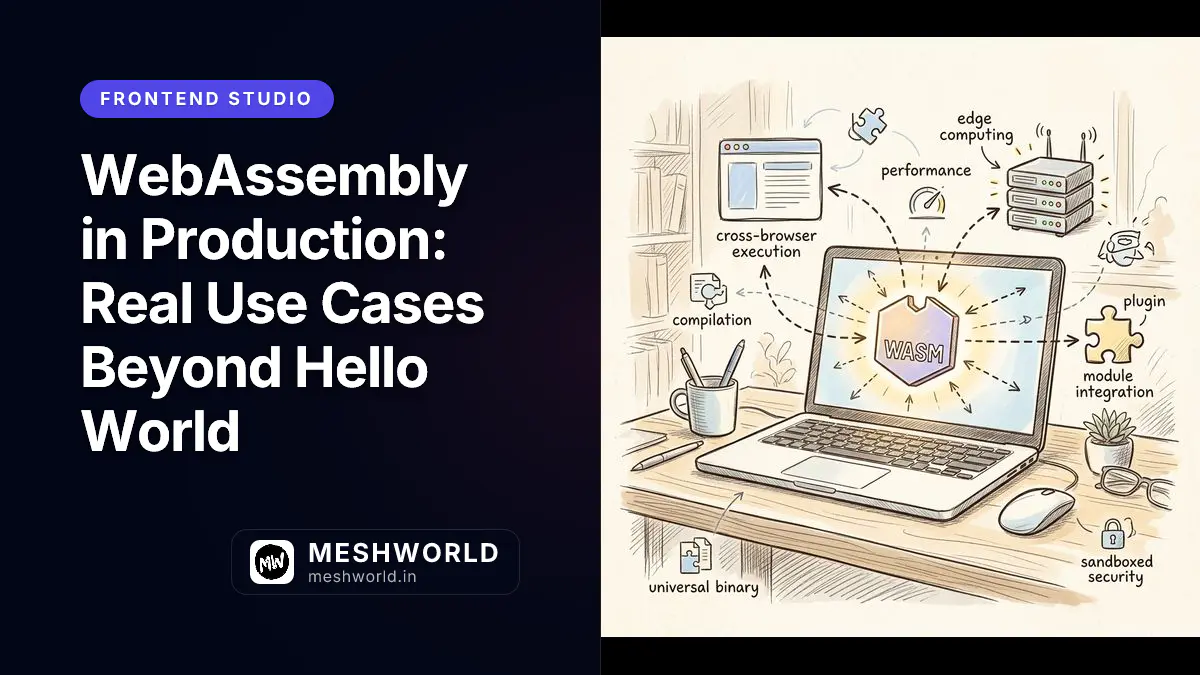
A Wasm module has no ambient access to anything. It cannot read a file, open a socket, or touch the DOM unless the host explicitly hands it a capability. Concretely:
- Linear memory is isolated. Each module gets its own contiguous byte array (
ArrayBuffer-backed in a browser). The module can only read and write inside that buffer. It cannot address host memory, other modules’ memory, or arbitrary process memory. Out-of-bounds access traps immediately instead of corrupting adjacent memory the way a C buffer overflow would on bare metal. - Control flow is structured. Wasm has no raw
goto-to-anywhere; branches target only enclosing blocks/loops. Combined with a typed instruction set validated before execution, this closes off a huge class of the memory-corruption and control-flow-hijack exploits that plague native code. - Imports/exports are the only door. A module declares which host functions it needs (
imports) and which of its own functions the host can call (exports). If the host doesn’t grant an import, the module simply cannot call it. There’s no syscall table to smuggle a request through. - Capability-based, not permission-based. Compare this to a Node.js process, which by default can read your filesystem and hit the network. A Wasm module starts with zero capabilities; the embedder (Deno, a browser, Wasmtime) decides exactly what gets wired in.
This is exactly the property Fastly’s own documentation leans on: Fastly’s Compute platform explicitly describes using WebAssembly to create “memory-safe, sandboxed execution environments” so a customer’s request-handling code can’t step outside its lane and touch another customer’s data or the host’s resources. Cloudflare makes the same architectural bet for Workers.

Image Prompt: A premium hand-drawn isometric vector doodle illustration. An isometric diagram showing a WebAssembly module as a sealed glass box sitting on a warm cream desk, with small labeled dashed-line arrows representing “imports” flowing in through a single guarded doorway and “exports” flowing out through another, a separate isolated block labeled linear memory drawn as a grid of little cubes next to the box, a padlock doodle on the box’s outer wall, clean black outlines, soft pastel yellow and blue accent highlights, graphite pencil shading, no text inside the diagram elements themselves, no watermark. Square 1
.How Do You Compile Rust to WebAssembly?
Rust is the most common systems language people reach for when targeting Wasm, mostly because wasm-pack and wasm-bindgen handle most of the JS-glue generation for you. Here’s the minimal real path, not a toy snippet.
First, scaffold a new library crate and add the wasm-bindgen dependency, which generates the JavaScript bindings for whatever functions you mark as exported:
# Create a new library crate
cargo new --lib wasm-demo
cd wasm-demo

# Add wasm-bindgen for JS interop glue generation
cargo add wasm-bindgen
Next, write the actual logic. The #[wasm_bindgen] attribute macro tells the compiler which functions get exposed to JavaScript and handles the type marshaling between Rust and JS types automatically:
// src/lib.rs
use wasm_bindgen::prelude::*;

// Exposed to JS as a callable function once compiled to Wasm.
#[wasm_bindgen]
pub fn fibonacci(n: u32) -> u64 {
    match n {
        0 => 0,
        1 => 1,
        _ => {
            let (mut a, mut b) = (0u64, 1u64);
            for _ in 2..=n {
                let next = a + b;
                a = b;
                b = next;
            }
            b
        }
    }
}
Then run wasm-pack build targeting the web, which compiles Rust to a .wasm binary and generates a JS shim file next to it:
# Compile to Wasm and emit a web-ready JS wrapper in ./pkg
wasm-pack build --target web
That produces a pkg/ directory containing wasm_demo_bg.wasm (the actual compiled binary) alongside wasm_demo.js (a generated ES module that handles instantiation and exposes fibonacci() as a normal-looking async import). You import that generated file directly. You rarely hand-write the loading boilerplate yourself once wasm-bindgen is in the mix.
How Does JavaScript Talk to a WebAssembly Module?
Once you have a compiled module, the interop boundary is where most of the real engineering happens. Wasm functions can only pass numbers (integers and floats) directly: no strings, no objects, no arrays. Anything richer has to be marshaled through shared linear memory.
Here’s the low-level version, without wasm-bindgen doing the marshaling for you, so you can see what’s actually happening underneath:
// interop.js
// Loading the compiled module and wiring up a JS function it can import.
const importObject = {
  env: {
    // A host function the Wasm module can call, to log a number to the console.
    log_number: (n) => console.log("From Wasm:", n),
  },
};

async function run() {
  const response = await fetch("./add.wasm");
  const bytes = await response.arrayBuffer();

  // instantiate() compiles and instantiates in one step.
  const { instance } = await WebAssembly.instantiate(bytes, importObject);

  // Calling an exported Wasm function directly; only numeric args/returns work.
  const result = instance.exports.add(2, 3);
  console.log("2 + 3 =", result); // 5

  // instance.exports.memory is the module's linear memory, exposed as an
  // ArrayBuffer the JS side can read/write for anything beyond raw numbers.
  const view = new Uint8Array(instance.exports.memory.buffer);
  console.log("First 8 bytes of Wasm memory:", view.slice(0, 8));
}

run();
For strings or structured data, the pattern is: the JS side writes bytes into the module’s linear memory at an agreed offset (or an offset the module hands back after allocating), the Wasm function reads them by pointer and length, and the reverse happens for return values. This is exactly the boilerplate wasm-bindgen and similar tools (jco for the Component Model, AssemblyScript’s loader) exist to hide. Hand-rolling it for anything beyond numbers gets tedious fast, and it’s why almost nobody does it directly in production code. I hand-rolled this exact marshaling once for a WebGL video filter, and I have not gone back to do it again since.
What’s the Right Way to Load a WebAssembly Module?
There are three common loading patterns in production code, and picking the wrong one is a common, avoidable performance mistake.
The naive pattern fetches the full binary, buffers it in memory, then compiles:
// Naive: works everywhere, but blocks on a full download before compiling.
const response = await fetch("./module.wasm");
const bytes = await response.arrayBuffer();
const { instance } = await WebAssembly.instantiate(bytes, importObject);
The streaming pattern lets the browser compile the module while it’s still downloading, which matters for anything beyond a trivial binary size:
// Streaming: compilation starts as bytes arrive, not after the full download.
const { instance } = await WebAssembly.instantiateStreaming(
  fetch("./module.wasm"),
  importObject
);
instantiateStreaming requires the server to respond with Content-Type: application/wasm. Without that header, browsers reject the streaming path and silently fall back to the slower buffered route, so double-check this in your CDN or static host configuration.
The module-caching pattern separates compilation from instantiation, useful when you’ll create multiple instances of the same module (for example, one per request on a server-style runtime):
// Compile once, instantiate many times: cheaper for repeated instantiation.
const module = await WebAssembly.compileStreaming(fetch("./module.wasm"));
const instanceA = await WebAssembly.instantiate(module, importObject);
const instanceB = await WebAssembly.instantiate(module, importObject);How Do You Debug and Measure a WebAssembly Binary?
Wasm debugging and Wasm size tuning are the same problem viewed from two ends: both depend on what metadata you keep in the binary while developing, and what you strip out before shipping. Two separate toolchains handle the two halves.
Getting Source-Level Debugging to Work
Stepping through raw Wasm instructions is miserable, and you don’t have to. Chrome’s DevTools documentation describes a working source-level path for C/C++: compile with DWARF debug information included (the -g flag on emcc), then install the C/C++ DevTools Support (DWARF) Chrome extension. With both in place you get line-of-code breakpoints in your original source, variable values on hover, real function names in the call stack, and a Memory Inspector for reading the raw bytes behind an object. If you want that debug info available without fattening the shipped binary, Chrome’s docs point to -gseparate-dwarf=<filename> paired with -s SEPARATE_DWARF_URL, which moves the DWARF payload into a separate file the debugger fetches on demand.
On the Rust side, the rustwasm book’s debugging chapter is blunt about the prerequisites. Debug builds carry symbols by default, but release builds need debug = true set explicitly in the Cargo profile, otherwise your stack traces are a wall of wasm-function[42] entries. The book also recommends the console_error_panic_hook crate, which converts the famously useless RuntimeError: unreachable executed into a formatted Rust panic message routed through console.error. That single crate is worth adding on day one of any Rust-to-Wasm project. The book’s broader advice is to lean on wasm-bindgen-test or plain #[test] functions so that most bugs never need a Wasm debugger at all.
For inspecting a binary you didn’t build, WABT (the WebAssembly Binary Toolkit) is the standard kit. wasm2wat converts a binary back to readable text format, wasm-objdump prints section-level information the way objdump does for native binaries, wasm-validate confirms a file is actually spec-valid, and wasm-strip removes sections you don’t need to ship.
Measuring Where the Bytes Actually Went
Knowing your binary is too big is not the same as knowing why. The rustwasm book’s code size chapter recommends twiggy, a code size profiler that walks the call graph to tell you why a given function got included and what its retained size is, meaning how much space you’d actually reclaim if it and its now-dead dependencies disappeared. That’s the number that matters when you’re deciding what to cut.
Two findings from that same chapter are worth knowing before you start guessing at flags. First, opt-level = 's' sometimes produces a smaller binary than the more aggressive opt-level = 'z', so measure both rather than assuming the harder setting wins. Second, running the output through Binaryen’s wasm-opt is described as buying roughly another 15-20% on code size, often alongside a runtime speedup, which makes it close to free. Panic infrastructure is the other usual suspect: Rust’s panic machinery drags in formatting code, and the book suggests avoiding panics in hot paths precisely because of what they pull into the binary behind them.
What Is WASI, and Why Does It Matter Beyond the Browser?
Everything above assumes a JS host wiring up imports by hand. That falls apart the moment you want a Wasm module to open a file, read an environment variable, or make a network call in a server or CLI context, because there’s no browser DOM to import from and no standard set of imports every runtime agrees on.
WASI, the WebAssembly System Interface stewarded by the Bytecode Alliance, solves this by defining a standard set of capability-scoped interfaces for exactly that kind of system access, so the same .wasm binary can run unmodified on Wasmtime, Fastly’s Compute platform, or any other WASI-compliant host.
Per the official WASI documentation, the project has shipped three milestone releases:
- WASI 0.1 (Preview 1): the original, ad hoc POSIX-ish syscall surface: file access, clocks, random numbers, basic sockets. Widely implemented but not built on the Component Model.
- WASI 0.2 (Preview 2): a rebuild on top of the Component Model, giving WASI interfaces proper typed, composable definitions instead of a flat syscall table. This stabilized in late 2024.
- WASI 0.3 (Preview 3): adds native async support to the Component Model and refactors the WASI interfaces to use async primitives directly, per wasi.dev’s own description.
The capability model matters as much as the interface shapes. A WASI host doesn’t hand a module blanket filesystem or network access. It grants specific, pre-opened file descriptors or socket permissions at instantiation time. A Wasm module compiled to WASI and given no filesystem capability literally cannot read /etc/passwd, because there’s no ambient path-resolution syscall to abuse. The capability was never wired in. That’s the same sandboxing principle from the browser case, extended to a server-side execution context.
How Are Companies Actually Using WebAssembly in Production?
Set aside the demos. Here’s what verifiable, official sources say real production systems are doing with Wasm today, grouped into the three patterns that keep showing up.
Pattern 1: Edge Compute Sandboxes
Cloudflare Workers and Fastly Compute both use Wasm as the isolation primitive for running untrusted, multi-tenant customer code at the edge, instead of spinning up a container or VM per customer.
Cloudflare’s own docs describe two supported patterns: calling into a Wasm module from a JS Worker via WebAssembly.instantiate(), or writing the entire Worker in Rust using the workers-rs bindings, which expose Workers’ JS APIs (KV, Durable Objects, fetch) directly to Rust code compiled to Wasm. Cloudflare’s docs note SIMD is supported, but threading is not: “each Worker runs in a single thread, and the Web Worker API is not supported.”
Fastly built its entire Compute platform around the same idea: per the Fastly documentation, each request runs in a freshly instantiated Wasm sandbox with official SDKs for Rust, JavaScript, Go, and C++, using WASI as the system-interface layer for that request-handling code. The pitch is fast cold starts (sandboxes, not full VMs or containers) plus strong per-request isolation between tenants.
Pattern 2: In-Browser Plugin and Extension Hosts
Two well-documented cases here, both confirmed by the vendors’ own engineering blogs.
Figma’s rendering engine is written in C++ and compiled to WebAssembly via Emscripten, according to Figma’s own “Figma Rendering: Powered by WebGPU” post. The Wasm-compiled renderer sits underneath their newer WebGPU-based graphics layer. Figma’s earlier “Keeping Figma Fast” post traces this back to 2018, when restructuring the document renderer and fixing Wasm-specific bugs delivered a roughly 3x speedup. That is the origin of the widely repeated “Figma got 3x faster with Wasm” claim, and it is a real, vendor-confirmed number, not a rumor.
Visual Studio Code uses Wasm for a different job: sandboxing extension logic and running language servers inside vscode.dev (the browser-based version of VS Code, which has no access to a real filesystem or process model). Microsoft’s own VS Code blog walks through using the WebAssembly Component Model to integrate a Wasm library into an extension, and a follow-up post covers running that Wasm code inside a worker (so it doesn’t block the extension host’s main thread) and building a language server in a language that compiles to Wasm, using the @vscode/wasm-wasi-lsp package.
Pattern 3: Porting Existing Native Codebases to the Browser
This is the oldest and most literal use case: you have a large C, C++, or Rust codebase and you want it to run in a browser tab without a rewrite. Emscripten (for C/C++) and wasm-pack/wasm-bindgen (for Rust) are the two dominant toolchains here. Figma’s renderer, above, is itself an example of this pattern layered underneath the plugin-host pattern. The C++ rendering core was ported wholesale, then the browser-specific plumbing was built around it.
The honest caveat: porting is rarely a drop-in recompile. Anything touching threads, blocking I/O, or platform-specific APIs needs rework, because the browser sandbox doesn’t give you those primitives the way a native OS does. You’re trading a compile target, not a runtime environment.

Image Prompt: A premium hand-drawn sketch note style illustration. A cozy development workspace showing a laptop screen split into four connected stages with hand-drawn arrows flowing left to right: a small Rust gear icon labeled with a terminal window showing cargo build, then a box labeled wasm-bindgen with tiny gear teeth, then a small hexagonal binary block representing a compiled wasm file, then a browser window icon on the far right receiving it, warm hand-drawn lines, playful doodle annotations like small sparks near the gear icon, soft pastel blue and yellow color accents on a clean cream paper background, no watermark, no text. Square 1
.Is WebAssembly Actually Faster Than JavaScript?
The honest answer is: sometimes, and the gap is workload-shaped, not universal. This is the section most Wasm marketing skips.
Where Wasm reliably wins:
- CPU-bound, numeric, or branch-heavy code: codecs, image/video processing, physics simulation, cryptography, compression. Wasm’s typed, statically-validated instruction set lets the underlying JIT skip a lot of the type-guessing and deoptimization work a JS engine does for the equivalent dynamically-typed code.
- Long-running computation where startup cost amortizes. If a module runs for seconds or does thousands of operations, the one-time cost of fetching and compiling the binary is a rounding error.
- Deterministic, reproducible execution. Because Wasm has no garbage collector pauses in the classic (pre-GC-proposal) model and a fixed instruction set, timing tends to be more predictable than JS’s JIT-warmup-dependent curve, which is useful for real-time audio/video or physics.
Where JavaScript often wins, or Wasm’s advantage evaporates:
- Small scripts and short-lived workers. Fetching and compiling even a modestly sized
.wasmbinary has real latency. A JS function that does the same job might already be JIT-warm and running before the Wasm module finishes instantiating. - DOM-heavy or string-heavy work. Wasm has no direct DOM access and no native string type. Every DOM touch or string operation crosses the JS↔Wasm boundary, and that boundary has real per-call cost, as covered above.
- Code that’s already fast enough. Modern JS engines (V8, SpiderMonkey) are extremely well-optimized JITs. A lot of “obviously CPU-bound” JS code is already running close to native speed after warmup; Wasm’s ceiling is higher, but you have to actually be hitting the current JS floor for that ceiling to matter.
When Should You Actually Adopt WebAssembly Instead of Plain JS?
Use this as a working checklist rather than a verdict. Most real decisions land somewhere in the middle.
Signals That Favor Wasm
- You already have a mature, tested C/C++/Rust codebase doing the work, and rewriting it in JS would mean re-implementing years of correctness fixes.
- The workload is CPU-bound and long-running enough that instantiation cost amortizes: image/video codecs, cryptographic operations, physics/simulation, parsers for complex binary or text formats.
- You need to run untrusted or semi-trusted third-party code with strict, capability-based isolation: plugin systems, multi-tenant edge functions.
- You need deterministic performance across different JS-engine warmup states, particularly for real-time media.
Signals That Favor Plain JavaScript
- The workload is small, short-lived, or dominated by DOM manipulation and string handling.
- Your team has no systems-language expertise and the workload doesn’t clearly justify the ramp-up cost of Rust/C++ plus a Wasm toolchain.
- The performance-sensitive path is a small fraction of total execution time. Optimizing it won’t move the overall metric you actually care about.
- You need broad debugging ergonomics; browser devtools support for Wasm (source maps, breakpoints inside Rust/C++ source) has improved but is still generally rougher than native JS debugging.
A Simple Decision Framework
- Measure first. Profile the actual JS implementation before assuming it’s “too slow.” A surprising amount of “obviously needs Wasm” code turns out to be bottlenecked on something Wasm won’t fix (network waterfalls, unnecessary re-renders, unindexed queries).
- Isolate the hot path. If Wasm is justified, scope it to the specific CPU-bound function or module. Don’t port an entire application. The JS↔Wasm boundary cost means a small, well-defined interface beats a chatty one.
- Check your target runtime’s actual constraints. Threading, streaming compilation, WASI maturity, and binary size limits vary meaningfully between browsers, Cloudflare Workers, Fastly Compute, and standalone runtimes like Wasmtime. Confirm before architecting around an assumption.
- Budget for the toolchain, not just the code.
wasm-pack, Emscripten, and the Component Model tooling all add build complexity, CI time, and a second language’s dependency ecosystem to maintain.

Image Prompt: A premium hand-drawn isometric vector doodle illustration. An isometric diagram showing a small paper airplane doodle representing an incoming HTTP request traveling from a laptop icon on the left toward a glowing hexagonal sandbox module in the center labeled with tiny padlock and gear doodles representing an edge Wasm sandbox, then a dashed arrow continuing right toward a small server rack icon, clean black outlines, soft pastel teal and orange accent highlights on a warm cream background, graphite pencil shading, no text, no watermark. Square 1
.Summary
- WebAssembly reached version 3.0 in July 2026, adding garbage collection, 64-bit memory, and exception handling to what used to be a numbers-only sandbox.
- The sandbox model (isolated linear memory, structured control flow, capability-based imports/exports) is why Cloudflare and Fastly trust it to run untrusted multi-tenant code at the edge.
- WASI extends that same sandboxing to server and CLI contexts through capability-scoped system interfaces, currently at milestone 0.3, though real-world platform support still lags the spec.
- Verified production patterns cluster into edge compute sandboxes (Cloudflare Workers, Fastly Compute), in-browser plugin/extension hosts (Figma, VS Code), and porting native codebases to the browser.
- Wasm beats JS on CPU-bound, long-running, or isolation-sensitive workloads, and loses on small, DOM-heavy, or string-heavy code. Profile before you commit to a rewrite.
Frequently Asked Questions
Does WebAssembly replace JavaScript?
No. Wasm is designed to run alongside JavaScript, not replace it. It has no direct DOM access, no native string or object types, and depends on a JS (or WASI) host to load it and provide any capability beyond raw computation on numbers in linear memory.
Can WebAssembly run outside the browser?
Yes. Standalone runtimes like Wasmtime, and platforms like Fastly Compute and (with caveats) Cloudflare Workers, execute Wasm modules server-side using WASI for system-level access such as file or network operations, without any browser involved.
Is WebAssembly secure by default?
The sandbox is memory-safe and capability-scoped by construction. A module can’t touch memory or resources it wasn’t explicitly given access to. That doesn’t make application logic inside the module secure; a module with a granted network import can still be instructed to make a malicious request if the logic driving it is flawed.
Do I need to know Rust or C++ to use WebAssembly?
Not necessarily. AssemblyScript lets you write Wasm-targeted code in TypeScript-like syntax, and many teams consume pre-built Wasm modules (image codecs, crypto libraries) without writing any Wasm-targeted source themselves. Writing performance-critical modules from scratch, though, is still dominated by Rust and C/C++ toolchains.
Why is my Wasm module slower than the JavaScript version it replaced?
Usually one of: the workload doesn’t amortize instantiation/compilation cost (too small or short-lived), the JS↔Wasm call boundary is being crossed too frequently for granular operations, or the binary wasn’t built in release mode with size/speed optimization flags. Profile the specific call pattern before assuming Wasm itself is at fault.
What to Read Next
- Optimizing Netlify Blobs for Edge Functions Caching: a practical look at what actually runs inside edge function sandboxes.
- Core Web Vitals Explained: How to Measure and Fix Your Scores: where raw execution speed does and doesn’t move the metrics that matter.
- Cloudflare Drop: Zero-Account Instant Static Web Hosting Guide: more on Cloudflare’s edge platform, from the hosting side of the stack.