Most privacy guides assume you have weeks to migrate. What if you need to secure your digital life today?
This is the emergency kit. Each section has an immediate action (do now, 5-15 minutes), a short-term action (do today, 30-60 minutes), and a long-term action (do this week, 1-3 hours).
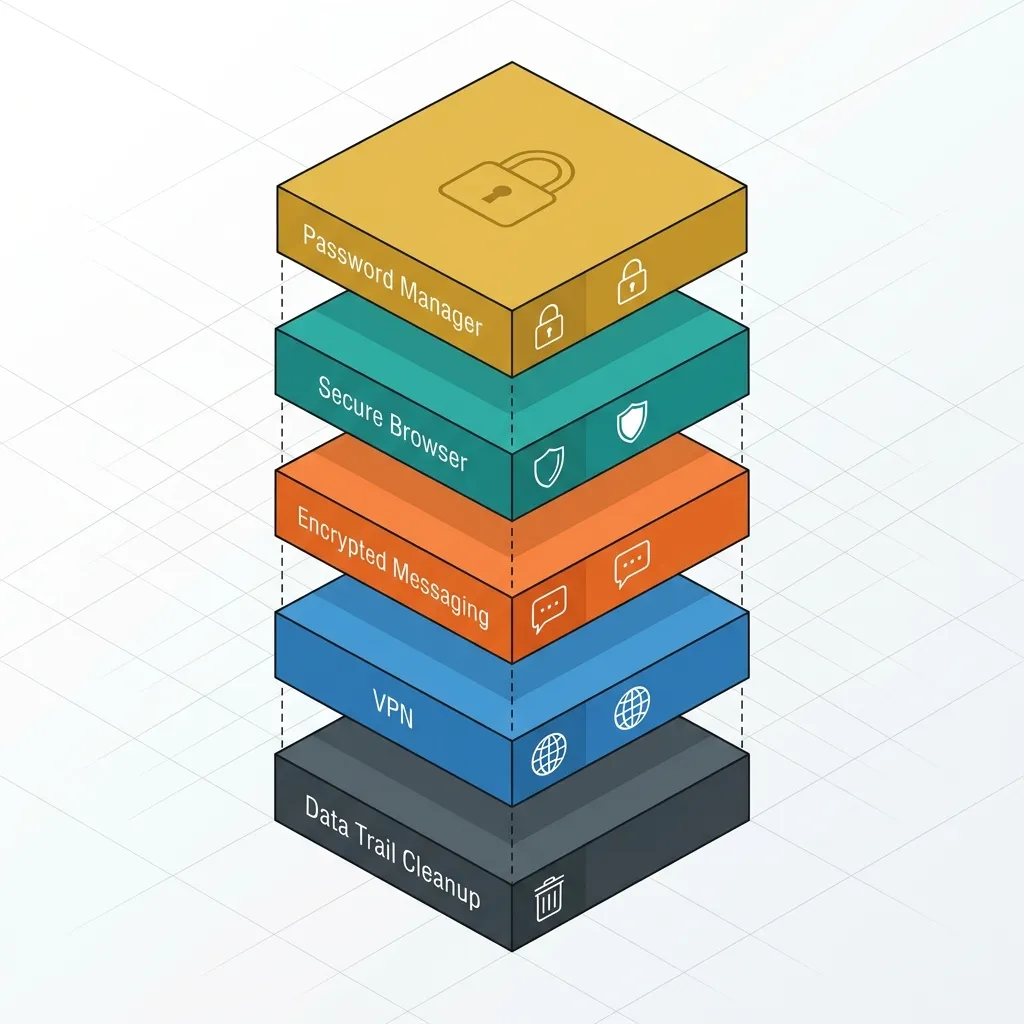
- Lock your accounts — Password manager + 2FA (15 min)
- Secure your browser — Switch to Brave or Librewolf (10 min)
- Encrypt your messages — Install Signal (5 min)
- Hide your IP — Set up WireGuard VPN (15 min)
- Clean your data trail — Remove old accounts, disable tracking (1-3 hours)
Step 1: Lock Your Accounts
Immediate (5 min)
Pick a password manager. Bitwarden is free, open source, audited, and works everywhere. Install it on all your devices. (See the full 2026 password manager comparison if you want to weigh it against 1Password and Dashlane first.)
Change your email password first — it’s the master key to every other account. Use a randomly generated password (20+ characters).
Short-term (30 min)
Enable two-factor authentication (2FA) on every account that supports it. Use an authenticator app, not SMS. Aegis Authenticator (Android, free, open source) or 2FAS (iOS/Android, free) are good choices. Avoid cloud-synced authenticators — they defeat the purpose.
Priority order for 2FA:
- Email (Google, Outlook, Proton)
- Social media (Twitter/X, LinkedIn, Instagram)
- Financial (banking, UPI, crypto exchanges)
- Cloud storage (Google Drive, iCloud, Dropbox)
- Developer accounts (GitHub, AWS, Vercel)
Long-term (1 hour)
Generate unique passwords for every account (Bitwarden does this automatically). Delete accounts you no longer use (justdeleteme.xyz helps). Store 2FA backup codes in your password manager.
Step 2: Secure Your Browser
Immediate (10 min)
Install Brave or Librewolf. Both block trackers by default, include fingerprinting protection, and require zero configuration.
If you can’t switch browsers today, at least harden the one you have:
- Chrome: Install uBlock Origin, set search to DuckDuckGo, disable third-party cookies
- Firefox: Set Enhanced Tracking Protection to Strict, enable DNS-over-HTTPS, install uBlock Origin
Short-term (30 min)
Set DuckDuckGo or Startpage as default search. Disable search suggestions (prevents keystroke leakage). Install Privacy Badger (EFF) for extra tracker blocking. Audit and remove unused extensions.
Long-term (1 hour)
Migrate bookmarks and passwords. Review privacy settings: disable telemetry, preloading, and any “safe browsing” features that phone home.
Step 3: Encrypt Your Messages
Immediate (5 min)
Install Signal on your phone. It’s the gold standard — E2EE by default, open source, audited. Tell the 3-5 people you communicate with most to install it too. Private messaging only works when both sides use it.
Short-term (30 min)
Review Signal’s privacy settings: turn off read receipts for non-contacts, disable link previews, disable typing indicators. Verify safety numbers with contacts you communicate with regularly.
Long-term (1 hour)
Migrate group chats from WhatsApp or Telegram to Signal. Set up Signal Desktop. Consider SimpleX or Session for additional anonymity if your threat model requires it.
Step 4: Hide Your IP
Immediate (15 min)
Option 1 (fastest): Mullvad VPN (€5/month, no account required, accepts cash/crypto). Download the app, connect. Done.
Option 2 (free): Install WireGuard on a $5/month VPS. Follow the WireGuard setup guide. Takes an hour but you own the infrastructure.
Short-term (30 min)
Enable the VPN kill switch. Set your VPN to auto-connect on untrusted networks. Test for DNS leaks at dnsleaktest.com.
Long-term (1 hour)
Set up a dedicated VPN for your home network (router-level or Raspberry Pi). Consider Mullvad Browser for browsing over VPN. Review your VPN’s logging policy.
Step 5: Clean Your Data Trail
Immediate (15 min)
Log out of devices you no longer use (Google, Facebook, Apple). Review app permissions on your phone — revoke camera, microphone, and location for apps that don’t need them. Disable ad personalization (Google Ad Settings, Facebook Ad Preferences).
Short-term (1 hour)
Run Google’s Privacy Checkup. Delete old search history, location history, and YouTube history at myactivity.google.com. Request data deletion from data brokers using SimpleLogin or DuckDuckGo’s Personal Information Removal.
Long-term (2-3 hours)
Delete old social media posts. Remove yourself from people-search sites (Whitepages, Spokeo, TruePeopleSearch). Consider a privacy-focused email provider (Proton Mail or Tuta) for new accounts. Shred or black out shipping labels on discarded delivery boxes to cut off physical address harvesting—see our detailed guide on Doorstep COD Parcel Scams.
The Privacy Stack
After the emergency steps, here’s your ongoing setup:
| Layer | Tool | Cost |
|---|---|---|
| Password manager | Bitwarden | Free |
| 2FA | Aegis or 2FAS | Free |
| Browser | Brave or Librewolf | Free |
| Search | DuckDuckGo | Free |
| Proton Mail (free) or Tuta | Free–€48/yr | |
| VPN | Mullvad | €5/mo |
| Messenger | Signal | Free |
| DNS | Quad9 or NextDNS | Free |
| File backup | Cryptomator + any cloud | Free |
Quick Checklist
For when you’re actually in a hurry:
- Are my passwords unique and stored in Bitwarden?
- Is 2FA enabled on my email and financial accounts?
- Am I using a privacy-focused browser?
- Is my primary messenger Signal?
- Am I connected to a VPN on public WiFi?
- Have I reviewed app permissions on my phone?
- Have I disabled ad tracking on my phone and browser?
- Are my OS and browser up to date?
- Are my backups encrypted?
The most important step is the first one. Install Bitwarden, change your email password, enable 2FA. That’s 15 minutes and it stops 90% of attacks cold. Everything else you can do this week. Start with the Private Messengers Comparison for the Signal migration.