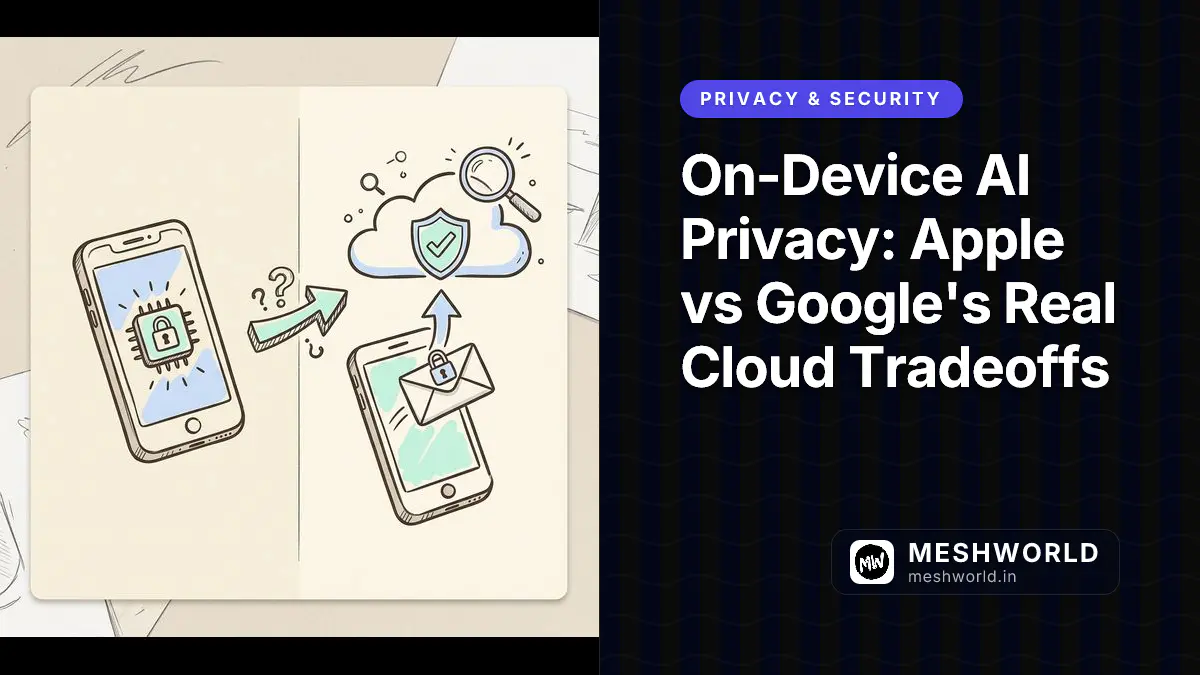
Every time you ask Siri to condense a long email thread or tap Android’s “Rewrite” suggestion in Gboard, one question matters more than any marketing slide: did that request stay on your device, or did it leave for a server somewhere? Apple answers this with Private Cloud Compute. Google answers it with AICore and Gemini Nano. Both companies publish real engineering documentation about how this works, and both leave real gaps their marketing doesn’t advertise.
This guide traces every architectural claim back to Apple’s and Google’s own engineering documentation, published as of August 2026, so you can tell the difference between “verified by the vendor’s own technical docs” and “trust us.” It’s written for developers evaluating whether to build on these platforms and for privacy-conscious users deciding how much of their data they’re comfortable routing through a phone’s AI features.
Prerequisites
Before you get into the architecture, it helps to already have:
- A general sense of what an LLM is and why bigger models need more compute (no ML background required beyond that)
- Basic familiarity with terms like “encryption,” “attestation,” and “API” (we define each the first time it matters)
- If you’re evaluating this for a product decision: access to Apple’s Private Cloud Compute Security Guide and Google’s AICore developer documentation open in another tab, since we link to specific sections throughout
What Does “On-Device AI” Actually Mean, Technically?
“On-device AI” gets used as a blanket privacy claim, but it describes a spectrum of very different engineering decisions. At minimum, it means the inference step (the actual forward pass through the neural network that turns your prompt into an output) happens on local silicon instead of a remote server. It does not automatically mean the model was trained without your data, that the app has no network access at all, or that every feature in the app avoids the cloud. Those are separate, additional guarantees a vendor has to make on top of “inference is local.”
Why Model Size Is the First Constraint
Large frontier models (hundreds of billions of parameters) need dozens of gigabytes of memory and specialized accelerators to run at usable speed. No current phone or laptop has that. So the first thing any “on-device AI” vendor does is shrink the model, through quantization (representing weights with fewer bits), pruning (removing redundant parameters), and distillation (training a smaller model to mimic a larger one’s behavior), until it fits in a few gigabytes of RAM and runs fast enough on a phone’s neural processing unit (NPU).
Apple’s on-device model in its third-generation foundation model family, AFM 3 Core, is a roughly 3-billion-parameter dense model, according to Apple’s own machine learning research publication. Apple also ships a larger on-device variant, AFM 3 Core Advanced, at around 20 billion parameters using a sparse mixture-of-experts design that activates only 1 to 4 billion parameters per request. The full model sits in flash storage, and only the relevant “expert” sub-networks get loaded into active memory. That’s how a laptop hosts a 20B-parameter model without needing 20B parameters’ worth of RAM live at once.
Google’s equivalent is Gemini Nano, described in Android’s developer documentation as a lightweight foundation model built specifically for on-device execution, run through Android’s AICore system service using hardware accelerators (NPU, GPU, or DSP depending on the device) for low-latency inference.
The NPU Is the Privacy Boundary, But Only for Inference
The Neural Processing Unit matters here for a specific reason: it lets the “AI computation” happen in a way that’s physically separate from general-purpose CPU execution, which makes it easier to reason about what data the model touches and where it goes. Apple’s Neural Engine and the NPUs Android’s AICore targets both exist to make on-device inference fast enough to be usable. A 3-billion-parameter model on a CPU alone would be too slow for a live typing suggestion.
But the NPU only handles the math. It doesn’t decide, by itself, whether a request needed the cloud in the first place. That decision, the actual privacy-relevant fork in the road, happens in software above the NPU, in Apple Intelligence’s orchestration layer or Android’s AICore service. This is the distinction the rest of this article focuses on: not “does an NPU exist,” but “who decided this request could stay local, and can you verify that decision was made honestly.”
How Does Apple’s Private Cloud Compute Architecture Actually Work?
Private Cloud Compute (PCC) is Apple’s answer to a specific engineering problem: some Apple Intelligence requests are genuinely too large or complex for a 3-billion-parameter on-device model, but Apple doesn’t want to just hand that request to a generic cloud server the way most AI vendors do. Apple’s own framing, from its support documentation, is that PCC “extends the privacy and security of your Apple devices into the cloud” using “larger, server-based models powered by Apple silicon.” At the same time, the most capable of Apple’s server-side models, AFM 3 Cloud Pro, is described in Apple’s own foundation model research report as optimized for NVIDIA GPUs running in Google Cloud infrastructure, not Apple silicon. Both facts come from Apple’s own publications, and they aren’t really in tension once you realize PCC’s guarantees are about data handling, not chip brand loyalty. It’s just a detail Apple’s consumer-facing marketing doesn’t surface.
Cryptographic Node Attestation: Your Device Verifies the Server, Not the Other Way Around
The mechanic that makes PCC different from “just another cloud API” is attestation. According to Apple’s Private Cloud Compute security documentation, before your device sends any data to a PCC node, it demands cryptographic proof of exactly which software is running on that node. It then encrypts the request only to the public keys of nodes it has verified. If a node can’t produce a valid attestation, or is running code that doesn’t match a published, signed release, your device refuses to send it data at all.
flowchart TD
    A["Apple Intelligence request too complex for on-device model"] --> B["Device requests attestation from candidate PCC nodes"]
    B --> C{"Node presents valid cryptographic attestation<br/>matching a published signed software image?"}
    C -- No --> D["Device refuses to send request to that node"]
    C -- Yes --> E["Device encrypts request to that node's verified public key"]
    E --> F["PCC node processes request in stateless, ephemeral compute"]
    F --> G["Response returned to device"]
    G --> H["Apple states no logging, no retention, no access by staff"]
Image Prompt: A premium hand-drawn isometric vector doodle illustration on warm cream paper. A smartphone on the left sends a small padlocked envelope labeled with a question mark toward a row of three server towers on the right, each server tower has a hand-drawn shield-and-checkmark badge above it representing cryptographic attestation, one server tower in the middle is drawn with an X through it and a “reject” doodle arrow bouncing the envelope back to the phone, graphite outline linework, dashed connection lines between phone and servers, soft pastel blue and mint highlights, small hand-drawn lock icons, no text, no watermark. Square 1
.This flips the usual trust model. With a normal cloud API, you send your data and trust the vendor’s privacy policy. With PCC, according to Apple’s documentation, the device is the one doing the verification, and it can decline to send anything to a node it can’t cryptographically confirm.
Stateless Compute: No Logging, No Retention
Apple’s documentation states that data sent to PCC is used “exclusively for the purpose of fulfilling the user’s request,” that it is “never available to anyone other than the user, not even to Apple staff,” and that no retention occurs “including via logging or for debugging, after the response is returned.” Apple backs the “no persistence” part of this with a hardware mechanism: the Secure Enclave on each PCC node randomizes the data volume’s encryption keys on every reboot and does not persist those keys, so a rebooted node is described as cryptographically incapable of reading data it previously handled. Apple calls this being “cryptographically erased” on every restart.
Publishing the Proof: Transparency Log and 90-Day Binary Releases
The claim that would otherwise be unverifiable, “trust us, the software running on these servers really is what we said it is,” is the part Apple tries hardest to make checkable. According to Apple’s PCC documentation:
- Apple publishes measurements of all code running on PCC into an append-only, cryptographically tamper-evident transparency log.
- Apple commits to making every production PCC software image publicly available within 90 days of it running in production, so outside researchers can inspect exactly what ran.
- Apple ships a Private Cloud Compute Virtual Research Environment (VRE) that lets researchers run PCC software on a Mac with Apple silicon to study it directly, rather than only reading a description of it.
- Apple’s Security Bounty program includes specific, elevated payout categories for anyone who can demonstrate a break in PCC’s core privacy or security guarantees — including “accidental data disclosure” scenarios.
- Apple also states it publishes the sepOS firmware and iBoot bootloader source in plaintext, which independent security researchers can audit against the binaries actually running.
Consent Layer: ChatGPT Integration and Ask-Before-Send
Separate from PCC, Apple’s own support documentation for the Siri-ChatGPT integration states that users control when ChatGPT is used and are asked before any information, including photos or files, is sent to ChatGPT, unless the user has explicitly opted to let Siri send requests automatically without asking each time. This is a meaningfully different privacy model than PCC: PCC is Apple’s own infrastructure, described as bound by Apple’s stated design commitments above, while the ChatGPT integration hands data to a genuinely separate company (OpenAI) under a distinct consent gate. Conflating the two, treating “it might use ChatGPT” and “it might use Private Cloud Compute” as the same kind of event, is a common misunderstanding worth clearing up for anyone evaluating what “Apple Intelligence sent something to the cloud” actually means in a given moment.
How Does Android’s AICore and Gemini Nano Handle On-Device Privacy?
Android’s approach predates the current “on-device AI” marketing cycle by several years. It grew out of Android’s Private Compute Core, introduced with Android 12, which was originally built for features like Live Caption and Smart Reply rather than generative AI. Gemini Nano was layered onto that existing isolation architecture, run through a newer system service called AICore.
AICore: A System Service With No Direct Internet Access
According to Android’s developer documentation, AICore is the Android OS component that manages and runs Gemini Nano locally: it handles model distribution, keeps the model updated, and exposes it to apps through the Google AI Edge SDK and, at a higher level, ML Kit’s GenAI APIs (which cover prompt-based generation, summarization, proofreading, rewriting, and image description). The documentation states that AICore isolates each request and does not persistently store input or output data after processing.
The specific architectural claim worth understanding, because it’s the Android equivalent of Apple’s attestation model, is about network access. Per Google’s Private Compute Core documentation, components running inside this isolated environment do not have direct access to the network. Instead, they can only reach the outside world through a narrow, defined set of APIs exposed by a separate, open-source companion component called Private Compute Services, and any new capability added to that boundary has to be justified as privacy-preserving before it ships. Google has also published the Private Compute Services code as open source on GitHub, which lets outside developers read exactly what that narrow network path is allowed to do, rather than take Google’s word for it.
flowchart LR
    A["Android App"] --> B["Google AI Edge SDK / ML Kit GenAI API"]
    B --> C["AICore system service"]
    C --> D["Gemini Nano model + on-device safety filters"]
    D --> E["NPU / GPU / DSP hardware acceleration"]
    C -.no direct internet access.-> F["Private Compute Services<br/>(open-source companion APK)"]
    F -.only narrow, defined APIs.-> G["Network / model update servers"]
Image Prompt: A premium hand-drawn isometric vector doodle illustration on warm cream paper. An Android phone icon on the left connects through a chain of three labeled boxes drawn with dashed connector lines — an app box, an AICore gear-shaped box, and a small padlocked model box — with a hand-drawn wall doodle with a single narrow gate in it separating the padlocked box from a cloud-shaped server icon on the right, representing restricted network access, graphite outline linework, soft pastel green and yellow highlights, small hand-drawn gear and padlock icons, no text, no watermark. Square 1
.Restricted Package Binding and OTA-Only Allowlist Changes
Google’s Private Compute Core documentation adds a second layer: even the small set of system packages allowed to interact with the isolated environment is fixed, and that allowlist can only be changed through a full Android OTA (over-the-air) system update, not through a routine app update pushed via the Play Store. This is meant to prevent a scenario where a single app update quietly expands what can talk to the isolated AI subsystem. Changing that boundary requires the same update mechanism that ships core OS security patches, which gets more scrutiny.
Hardware Fragmentation Is a Real Privacy Variable, Not Just a Performance One
Because AICore has to run across Qualcomm, MediaTek, and Google Tensor silicon (per Android’s own developer documentation), the low-level hardware security guarantees underneath AICore aren’t uniform the way they are on Apple’s single-vendor silicon stack. A phone’s secure element, its NPU sandboxing, and its key management can meaningfully differ between an OEM using a Snapdragon chipset and one using Tensor. Android’s documentation focuses on the OS-level isolation (Private Compute Core, AICore) that’s meant to hold regardless of chipset. But the strength of the hardware root of trust underneath that OS layer is a device-and-vendor-specific variable that a single Android developer page can’t fully account for.
When and Why Does On-Device AI Fall Back to the Cloud?
This is the question both companies answer the least precisely, and it’s the one that matters most for anyone trying to reason about what actually leaves their device on a given day.
Apple’s Stated Trigger: Model Capability, Not a Fixed Feature List
Apple’s own support documentation frames the PCC trigger as capability-based: “for more complex requests that require more computational capacity, Apple Intelligence can use Private Cloud Compute.” That’s a real answer, but it’s deliberately not a static list. Whether a given Siri request, Writing Tools rewrite, or Photos search query needs the larger server model depends on the request’s complexity as judged by Apple’s on-device orchestration layer, which can change between OS versions as the on-device model itself gets more capable (a request that needed PCC on iOS 18 might not need it on a later release with a stronger on-device AFM 3 Core). There’s no published, exhaustive table of “these exact ten features always use PCC,” because, by design, the answer is dynamic.
Google’s Stated Trigger: Model Fit, ML Kit vs. the Full Gemini App
Google’s documentation draws a sharper functional line than Apple’s, but along a different axis: it’s largely a line between products, not a dynamic complexity threshold within one product. ML Kit’s GenAI APIs and the AI Edge SDK are explicitly documented as running through Gemini Nano on AICore, on-device, by design, for the specific tasks they cover (prompt-based generation, summarization, proofreading, rewriting, image description, and audio transcription). The full Gemini app and Gemini Advanced, by contrast, are separate products that call Google’s cloud-hosted Gemini models over the network by default. That’s a different data path entirely, not a “fallback” from a failed on-device attempt.
Where fallback-like behavior does show up inside the on-device path is more mundane: device eligibility. AICore and Gemini Nano require specific hardware tiers (the Snapdragon/Dimensity/Tensor accelerator classes named in Android’s docs), and per the documentation, the model itself is distributed and updated by AICore rather than bundled with every app. That means a request from an unsupported or outdated device simply won’t have local Gemini Nano available at all, and the app has to either fail, degrade, or route to a cloud API as an app-level decision, not one AICore itself makes.
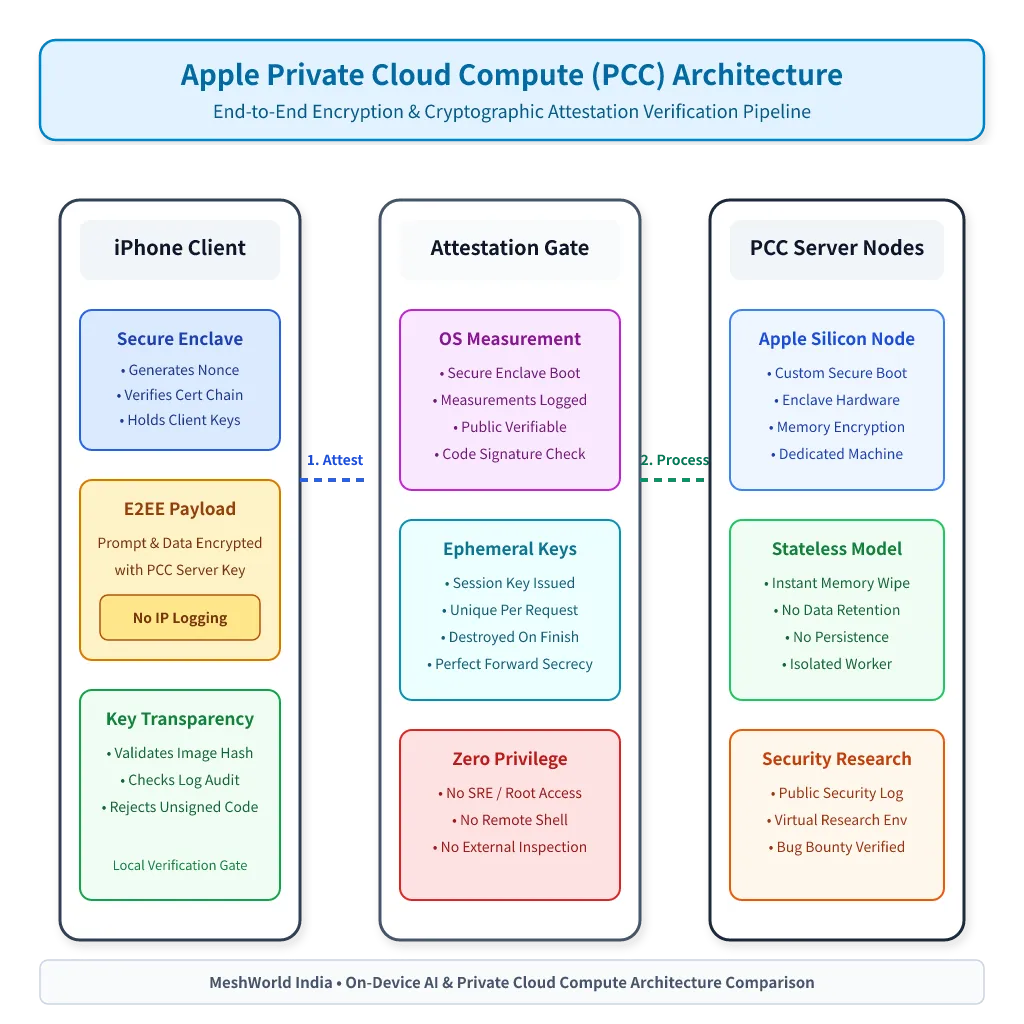
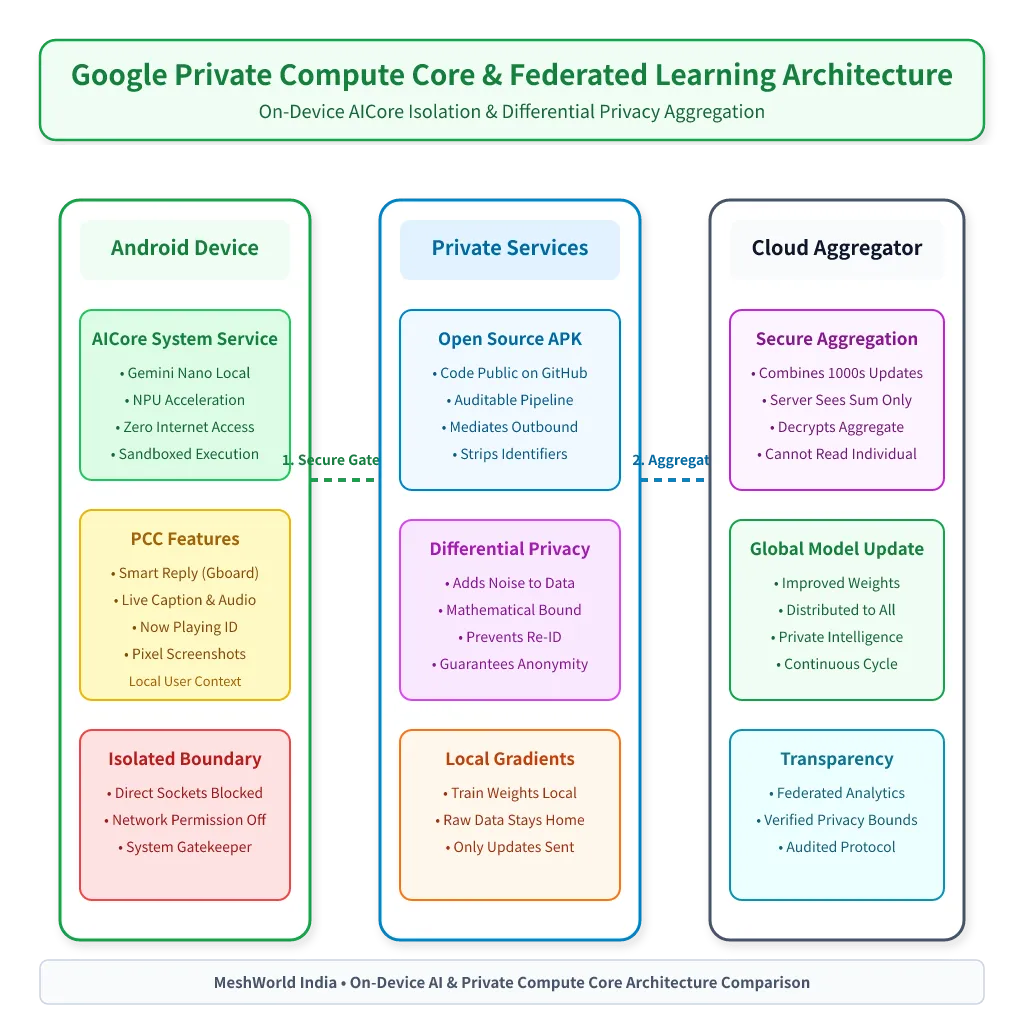
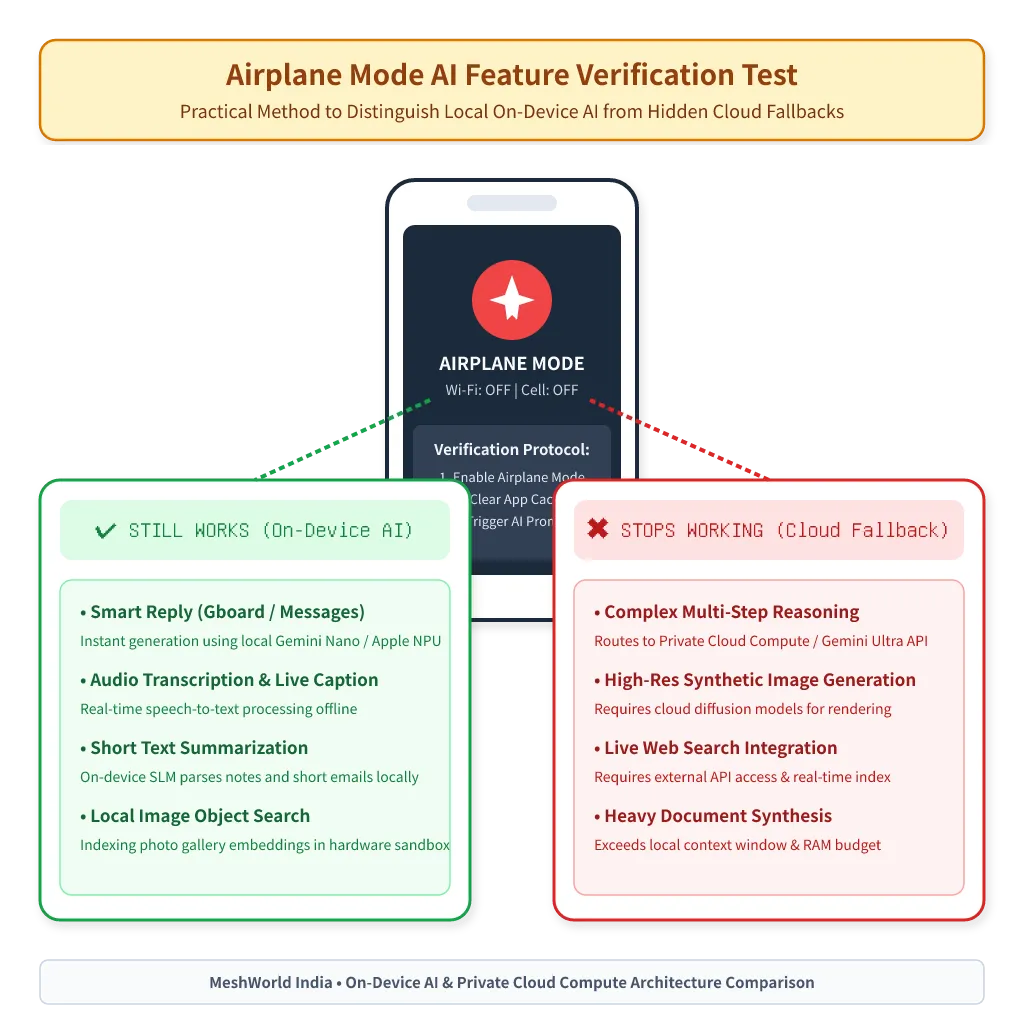
Image Prompt: A premium hand-drawn sketch note style illustration on warm cream paper. A cozy desk scene with a hand holding a smartphone showing an airplane icon on its screen, a small hand-drawn thought bubble above the phone with a tiny AI sparkle icon and a question mark, playful doodle arrows pointing from the phone to two hand-drawn signposts — one labeled with a checkmark doodle meaning “still works” and one with an X doodle meaning “stopped working” — warm graphite ink lines, soft pastel yellow and cyan highlight accents, scattered small doodles of a wifi-off icon, clean cream paper background. No text, no watermark. Square 1
.The Honest Summary: Both Vendors Reserve the Right to Decide, Case by Case
Neither Apple nor Google publishes a definitive, versioned list of exactly which requests go local and which don’t. Apple’s fallback is dynamic and complexity-based; Google’s split is more product-boundary-based (Nano-powered features vs. the cloud Gemini app), with device-tier eligibility as a secondary factor inside the on-device path. If a vendor’s marketing implies “100% on-device, always” for a general-purpose assistant feature, that claim deserves the same scrutiny either company’s own documentation invites you to apply, because both companies’ own technical writing describes systems that are explicitly designed to escalate to the cloud under conditions they don’t fully enumerate in advance.
How Do You Evaluate Any Vendor’s On-Device AI Privacy Claims?
The Apple and Google architectures above give you a template for judging any vendor, including smaller AI app makers who use “on-device” and “private” as marketing shorthand without Apple’s or Google’s engineering depth behind it.
1. Is There a Published Technical Security Document, or Just a Privacy Policy?
A privacy policy is a legal promise. A security architecture document, like Apple’s PCC Security Guide or Google’s Private Compute Core writeup, is an engineering claim specific enough that it can be wrong, and therefore specific enough to be checked. If a vendor’s only public artifact is a marketing page saying “your data never leaves your device,” and there’s no technical documentation explaining the actual data flow, treat that as an unverified claim, not a verified one.
2. Is There Any Independent Verification Mechanism?
Look for one of: cryptographic attestation the client performs before sending data (Apple’s approach), open-source code for the network-facing boundary that any developer can read (Google’s Private Compute Services on GitHub), a bug bounty program specifically scoped to the privacy claim, or a published transparency log. The absence of all four doesn’t automatically mean a vendor is lying (plenty of legitimate smaller companies simply don’t have Apple’s or Google’s audit budget), but it does mean you’re relying on trust rather than verification, and you should weigh that accordingly for sensitive data.
3. Does the Vendor Say Explicitly When It Falls Back to the Cloud?
As shown above, even Apple and Google don’t give you a complete, static answer to this. But there’s a real difference between a vendor that says “complex requests use our server infrastructure, here’s roughly what triggers that” and one that never mentions cloud fallback at all despite offering features (long-context summarization, image generation, voice cloning) that are computationally implausible to run on a phone’s NPU. If a vendor markets “on-device AI” for a feature that would require tens of gigabytes of model weights, ask what’s actually happening. The honest answer is often “a small on-device model handles part of the pipeline, and a cloud model handles the rest,” which is a fine design, but not the same claim as “fully on-device.”
4. Is Training Data Handling Described Separately From Inference Handling?
“Runs on-device” is a statement about inference. It says nothing about whether your data, or data resembling it, was used to train the model beforehand, or whether interaction logs get used for future training even if the request itself never left your device unencrypted. Apple’s foundation model documentation states its models were trained without private user data; check whether a smaller vendor makes an equivalent, specific statement, or leaves the training question conspicuously unaddressed while emphasizing only the inference story.
5. Does “No Logging” Mean No Logging, or No Logging By Default?
Vendors sometimes state a strong no-retention policy that applies to standard operation but carves out debugging, abuse detection, or “service improvement” as exceptions in the fine print. Apple’s PCC documentation explicitly states no retention “including via logging or for debugging,” which is a stronger, more specific claim than a vague “we don’t keep your data.” Read the exception clauses, not just the headline claim.
6. Would the Claim Survive Airplane Mode?
This is the cheapest practical test available to any non-technical user. If a feature genuinely runs fully on-device, it should keep working with networking disabled (aside from things like model downloads that happen once, ahead of time). If a supposedly “on-device” feature breaks the moment you cut connectivity, either the marketing is imprecise or the feature has an undisclosed cloud dependency. Either way, it’s worth knowing before you feed it anything sensitive.
Summary
- “On-device AI” describes where inference happens, not automatically whether training data was private, whether the app has network access, or whether every feature stays local. These are separate claims a vendor has to make explicitly.
- Apple’s Private Cloud Compute backs its privacy claims with cryptographic attestation, a stated no-logging design, a public transparency log, and a 90-day binary release commitment. These are independently checkable mechanisms, not just marketing language, even though full production-wide verification remains something only Apple and outside VRE researchers can fully confirm.
- Google’s AICore and Gemini Nano rely on Android’s Private Compute Core isolation model (no direct network access, narrow mediated APIs, OTA-only allowlist changes), but as of 2026-08-09, Google’s public documentation doesn’t describe a per-request cryptographic attestation mechanism equivalent to Apple’s.
- Both vendors reserve dynamic discretion over when a request escalates to the cloud, and neither publishes an exhaustive, versioned list of trigger conditions. That means “fully on-device, always” claims about general-purpose assistant features deserve skepticism from either vendor and especially from smaller ones.
- The most useful habit for evaluating any AI privacy claim, from any company, is asking for a technical security document (not a privacy policy), an independent verification mechanism, and an explicit fallback description — and testing the feature under airplane mode when in doubt.
Frequently Asked Questions
Does Apple Intelligence ever send my data to Apple’s cloud without telling me?
Per Apple’s own support documentation, Private Cloud Compute activates for requests too complex for the on-device model, and Apple states this is disclosed as part of how the feature behaves rather than hidden. Separately, the Siri-ChatGPT integration requires explicit per-request confirmation before sending information to ChatGPT unless you’ve turned on automatic sending. If a specific feature stops working in airplane mode, that’s a practical sign it depends on connectivity, whether to PCC or a third-party service.
Is Android’s Gemini Nano fully offline, or does it also use the cloud?
Gemini Nano, accessed through AICore and ML Kit’s GenAI APIs, is documented by Google as running inference locally with no network calls for the covered tasks (prompt generation, summarization, proofreading, rewriting, image description). The full Gemini app is a separate cloud-hosted product and isn’t the same thing as Gemini Nano running through AICore. Conflating the two is the most common misunderstanding about Android’s on-device AI story.
Can Apple or Google employees read my on-device AI requests?
For requests handled entirely by the on-device model (Apple’s AFM 3 Core or Google’s Gemini Nano), Apple’s and Google’s documentation describes those requests as never leaving the device, so there’s no server-side access point for anyone to read. For requests escalated to Apple’s Private Cloud Compute, Apple’s documentation explicitly states the data is never available to anyone other than the user, “not even to Apple staff,” backed by the stateless, ephemeral design described above. Google’s AICore documentation doesn’t need to make an equivalent claim for its on-device path, since Gemini Nano inference doesn’t route through Google’s servers at all. The cloud-access question there applies to the separate Gemini app, not AICore.
Why does Apple’s on-device model run on Apple silicon but its top server model runs on NVIDIA GPUs in Google Cloud?
Because “on-device privacy” and “which chip runs the server-side model” are separate engineering decisions. Apple’s own foundation model research documentation states its most capable server model, AFM 3 Cloud Pro, is optimized for NVIDIA GPUs running in Google Cloud infrastructure, while Private Cloud Compute’s privacy guarantees (attestation, statelessness, non-targetability) are architectural properties Apple applies regardless of the underlying hardware vendor. It’s a useful reminder that “runs on Apple’s infrastructure” and “runs on Apple-designed chips” aren’t the same claim.
Is a bug bounty program actually meaningful, or just a PR move?
Apple’s Security Bounty program for Private Cloud Compute includes specific, elevated payout categories tied to demonstrating a break in PCC’s core privacy guarantees, including scenarios involving accidental data disclosure, which gives outside security researchers a direct financial incentive to find and report real flaws rather than just theorize about them. A bounty program doesn’t guarantee a system is flawless, but a well-scoped one with real payouts for the exact claims a vendor is making is a meaningfully stronger signal than a vendor simply asserting its own system is secure with no external incentive for anyone to check.
What to Read Next
- Signal Support Phishing Scam: How to Protect Your Encrypted Backups — another look at where a platform’s privacy architecture ends and social-engineering risk begins, from the same “verify, don’t assume” angle applied here.
- Tor vs VPN: Which Actually Protects Your Privacy? — a similar side-by-side breakdown of what two commonly conflated privacy tools actually guarantee versus what they don’t.
- Gemma 4 on Edge Devices: Android, Raspberry Pi, and IoT Applications — if you’re a developer who wants to run your own fully local model instead of relying on a vendor’s on-device AI stack at all.