Your AI agent needs to read your company’s internal docs, query your database, and create Jira tickets. Right now, you’re writing custom integrations for every single tool — one for Claude Code, another for Cursor, a third for your custom dashboard. Each one is brittle, vendor-locked, and takes days to build.
I’ve been there. I’ve built them all. And honestly? It’s exhausting.
Building on the foundational concepts I mapped out in my previous guide, MCP (Model Context Protocol): The Complete Developer’s Guide, MCP fixes this by standardizing the tool interface. Build one MCP server, and every MCP-compatible client connects automatically. This guide shows you how to build, deploy, and connect real MCP servers — with production-ready code examples you can actually use.
What Is MCP and Why Does It Matter?
MCP is an open protocol created by Anthropic that standardizes how AI models interact with external systems. Think of it as USB-C for AI tools — one connector, any device.
Before MCP, every AI tool had its own integration format:
- OpenAI had function calling with JSON Schema
- Claude had tool use with its own format
- LangChain had its own abstraction layer
- Every IDE plugin was custom-built
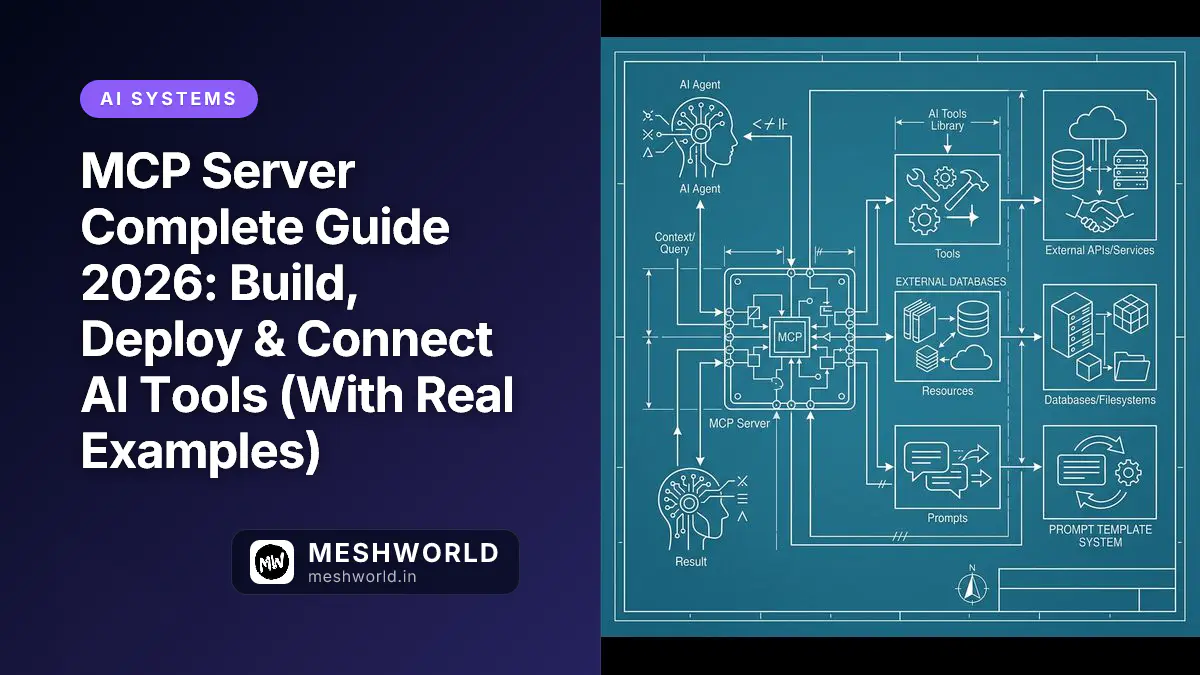
It was a mess. MCP unifies all of this. An MCP server exposes tools, resources, and prompts through a standardized JSON-RPC interface. Any MCP client can discover and use them — no custom integration needed.
Real-world scenario: Your team uses Claude Code for backend development, Cursor for frontend, and a custom Python agent for data pipelines. Without MCP, you write three separate integrations for your internal API. With MCP, you write one server. All three clients connect automatically. I’ve seen teams cut their integration dev time from weeks to hours.
Who’s Using MCP in 2026?
The ecosystem has exploded — and I don’t use that word lightly. As of mid-2026:
- Claude Desktop — native MCP support
- Cursor — full MCP client with UI for server management
- Windsurf — MCP integration in the IDE
- Zed Editor — MCP support built in
- Replit — MCP servers as a feature
- 50+ open-source clients — from CLI tools to web apps
- Hundreds of MCP servers — from database connectors to API wrappers
Core Concepts: The Three Primitives
Tools (Actions)
Tools are functions the LLM can invoke. They take inputs, perform actions, and return results.
// Example: A tool that creates a support ticket
{
  name: "create_ticket",
  description: "Create a new support ticket in the system",
  inputSchema: {
    type: "object",
    properties: {
      title: { type: "string", description: "Ticket title" },
      priority: { type: "string", enum: ["low", "medium", "high", "urgent"] },
      description: { type: "string", description: "Detailed description" }
    },
    required: ["title", "priority"]
  }
}
Resources (Data)
Resources are read-only data sources the LLM can reference. They’re identified by URI and can return text, JSON, binary data, or any MIME type.
// Example: Exposing database schema as a resource
{
  uri: "db://schema/users",
  name: "Users Table Schema",
  mimeType: "application/json",
  description: "Schema definition for the users table"
}
Prompts (Templates)
Prompts are reusable templates that help users (or LLMs) get started with common tasks.
// Example: A code review prompt template
{
  name: "security_review",
  description: "Review code for security vulnerabilities",
  arguments: [
    { name: "language", description: "Programming language", required: true },
    { name: "code", description: "Code to review", required: true }
  ]
}
Building Your First MCP Server (TypeScript)
Project Setup
Let’s get our hands dirty. Here’s what you need:
mkdir my-mcp-server && cd my-mcp-server
npm init -y
npm install @modelcontextprotocol/sdk zod
npm install -D typescript @types/node
npx tsc --init
Basic Server with Tools
import { Server } from "@modelcontextprotocol/sdk/server/index.js";
import { StdioServerTransport } from "@modelcontextprotocol/sdk/server/stdio.js";
import {
  CallToolRequestSchema,
  ListToolsRequestSchema,
} from "@modelcontextprotocol/sdk/types.js";
import { z } from "zod";

// Define tool schemas with Zod for runtime validation
const CreateTicketSchema = z.object({
  title: z.string().min(1).max(200),
  priority: z.enum(["low", "medium", "high", "urgent"]),
  description: z.string().optional(),
});

const SearchDocsSchema = z.object({
  query: z.string().min(1),
  limit: z.number().int().min(1).max(50).default(10),
});

// Tool definitions for MCP protocol
const TOOLS = [
  {
    name: "create_ticket",
    description: "Create a new support ticket",
    inputSchema: {
      type: "object" as const,
      properties: {
        title: { type: "string", description: "Ticket title (max 200 chars)" },
        priority: { type: "string", enum: ["low", "medium", "high", "urgent"] },
        description: { type: "string", description: "Optional detailed description" },
      },
      required: ["title", "priority"],
    },
  },
  {
    name: "search_docs",
    description: "Search internal documentation",
    inputSchema: {
      type: "object" as const,
      properties: {
        query: { type: "string", description: "Search query" },
        limit: { type: "number", description: "Max results (1-50, default 10)" },
      },
      required: ["query"],
    },
  },
];

// Create the MCP server
const server = new Server(
  { name: "my-company-mcp", version: "1.0.0" },
  { capabilities: { tools: {} } }
);

// Handle tool listing
server.setRequestHandler(ListToolsRequestSchema, async () => ({
  tools: TOOLS,
}));

// Handle tool execution
server.setRequestHandler(CallToolRequestSchema, async (request) => {
  const { name, arguments: args } = request.params;

  try {
    switch (name) {
      case "create_ticket": {
        const input = CreateTicketSchema.parse(args);
        const ticket = await createTicket(input);
        return {
          content: [{
            type: "text" as const,
            text: `Ticket created: ${ticket.id} — "${ticket.title}" (${ticket.priority})`,
          }],
        };
      }

      case "search_docs": {
        const input = SearchDocsSchema.parse(args);
        const results = await searchDocs(input.query, input.limit);
        return {
          content: [{
            type: "text" as const,
            text: results.map(r => `[${r.score}] ${r.title}\n${r.url}`).join("\n\n"),
          }],
        };
      }

      default:
        throw new Error(`Unknown tool: ${name}`);
    }
  } catch (error) {
    return {
      content: [{
        type: "text" as const,
        text: `Error: ${error instanceof Error ? error.message : String(error)}`,
      }],
      isError: true,
    };
  }
});

// Tool implementations
async function createTicket(input: z.infer<typeof CreateTicketSchema>) {
  const response = await fetch("https://api.yourcompany.com/tickets", {
    method: "POST",
    headers: {
      "Content-Type": "application/json",
      "Authorization": `Bearer ${process.env.API_TOKEN}`,
    },
    body: JSON.stringify(input),
  });
  if (!response.ok) throw new Error(`API error: ${response.status}`);
  return response.json();
}

async function searchDocs(query: string, limit: number) {
  const response = await fetch(
    `https://api.yourcompany.com/docs/search?q=${encodeURIComponent(query)}&limit=${limit}`,
    { headers: { "Authorization": `Bearer ${process.env.API_TOKEN}` } }
  );
  if (!response.ok) throw new Error(`Search failed: ${response.status}`);
  return response.json();
}

// Start the server
async function main() {
  const transport = new StdioServerTransport();
  await server.connect(transport);
  console.error("MCP server running on stdio");
}

main().catch(console.error);
Adding Resources
Tools let the LLM do things. Resources let it know things. Here’s how to expose data:
import {
  ListResourcesRequestSchema,
  ReadResourceRequestSchema,
} from "@modelcontextprotocol/sdk/types.js";

const RESOURCES = [
  {
    uri: "docs://api-reference",
    name: "API Reference",
    mimeType: "text/markdown",
    description: "Complete REST API documentation",
  },
  {
    uri: "config://environment",
    name: "Environment Config",
    mimeType: "application/json",
    description: "Current environment variables (secrets redacted)",
  },
];

// Update server capabilities
const server = new Server(
  { name: "my-company-mcp", version: "1.0.0" },
  { capabilities: { tools: {}, resources: {} } }
);

// List available resources
server.setRequestHandler(ListResourcesRequestSchema, async () => ({
  resources: RESOURCES,
}));

// Read resource content
server.setRequestHandler(ReadResourceRequestSchema, async (request) => {
  const { uri } = request.params;

  switch (uri) {
    case "docs://api-reference": {
      const docs = await fetch("https://api.yourcompany.com/docs.md").then(r => r.text());
      return { contents: [{ uri, mimeType: "text/markdown", text: docs }] };
    }
    case "config://environment": {
      const safeConfig = Object.fromEntries(
        Object.entries(process.env)
          .filter(([k]) => !k.match(/KEY|TOKEN|SECRET|PASSWORD/i))
      );
      return {
        contents: [{
          uri,
          mimeType: "application/json",
          text: JSON.stringify(safeConfig, null, 2),
        }],
      };
    }
    default:
      throw new Error(`Unknown resource: ${uri}`);
  }
});
Building an MCP Server in Python
If TypeScript isn’t your thing, don’t worry. The Python SDK is equally capable and often faster to prototype:
import asyncio
import os
from mcp.server import Server
from mcp.server.stdio import stdio_server
from mcp.types import Tool, TextContent, Resource
import httpx

server = Server("my-python-mcp")

@server.list_tools()
async def list_tools() -> list[Tool]:
    return [
        Tool(
            name="query_database",
            description="Run a read-only SQL query",
            inputSchema={
                "type": "object",
                "properties": {
                    "sql": {"type": "string", "description": "SELECT query to execute"},
                    "database": {"type": "string", "description": "Database name"}
                },
                "required": ["sql"]
            }
        ),
        Tool(
            name="deploy_service",
            description="Deploy a service to staging",
            inputSchema={
                "type": "object",
                "properties": {
                    "service": {"type": "string", "description": "Service name"},
                    "branch": {"type": "string", "description": "Git branch to deploy"}
                },
                "required": ["service", "branch"]
            }
        )
    ]

@server.call_tool()
async def call_tool(name: str, arguments: dict) -> list[TextContent]:
    if name == "query_database":
        # Connect to your database and run the query
        result = await run_query(arguments["sql"], arguments.get("database", "main"))
        return [TextContent(type="text", text=str(result))]

    elif name == "deploy_service":
        # Trigger deployment via your CI/CD API
        deployment = await trigger_deploy(arguments["service"], arguments["branch"])
        return [TextContent(
            type="text",
            text=f"Deployment triggered: {deployment['url']}\nStatus: {deployment['status']}"
        )]

    raise ValueError(f"Unknown tool: {name}")

async def run_query(sql: str, database: str):
    # Your database connection logic here
    # IMPORTANT: Only allow SELECT queries for safety
    if not sql.strip().upper().startswith("SELECT"):
        raise ValueError("Only SELECT queries are allowed")
    # ... execute query and return results

async def trigger_deploy(service: str, branch: str):
    async with httpx.AsyncClient() as client:
        response = await client.post(
            f"https://deploy.yourcompany.com/api/deploy",
            json={"service": service, "branch": branch},
            headers={"Authorization": f"Bearer {os.environ['DEPLOY_TOKEN']}"}
        )
        return response.json()

async def main():
    async with stdio_server() as (read_stream, write_stream):
        await server.run(read_stream, write_stream, server.create_initialization_options())

if __name__ == "__main__":
    asyncio.run(main())
Deploying MCP Servers
Local Deployment (stdio)
For local development and desktop clients, stdio transport is simplest. The client spawns your server as a subprocess and communicates via stdin/stdout. It’s dead simple and works every time.
Claude Desktop config (~/Library/Application Support/Claude/claude_desktop_config.json on macOS):
{
  "mcpServers": {
    "my-company": {
      "command": "node",
      "args": ["/absolute/path/to/your/server.js"],
      "env": {
        "API_TOKEN": "your-token-here"
      }
    }
  }
}
Cursor config (~/.cursor/mcp.json):
{
  "mcpServers": {
    "my-company": {
      "command": "node",
      "args": ["/absolute/path/to/your/server.js"]
    }
  }
}
Remote Deployment (HTTP + SSE)
For team-wide access, you’ll want to deploy your MCP server as a web service. Here’s the Express setup I use in production:
import express from "express";
import { SSEServerTransport } from "@modelcontextprotocol/sdk/server/sse.js";
import { StreamableHTTPServerTransport } from "@modelcontextprotocol/sdk/server/streamableHttp.js";

const app = express();
app.use(express.json());

// SSE transport (for older clients)
app.get("/sse", async (req, res) => {
  const transport = new SSEServerTransport("/messages", res);
  await server.connect(transport);
});

app.post("/messages", async (req, res) => {
  // Handle incoming messages via SSE transport
});

// Streamable HTTP transport (recommended for new deployments)
app.post("/mcp", async (req, res) => {
  const transport = new StreamableHTTPServerTransport({
    sessionIdGenerator: undefined, // Stateless
  });
  await server.connect(transport);
  await transport.handleRequest(req, res);
});

app.listen(3000, () => {
  console.log("MCP server running on http://localhost:3000");
});Production Best Practices
I’ve seen too many MCP servers deployed with zero security. Don’t be that person. Here’s what you need:
1. Authentication & Security
Never expose an MCP server to the network without authentication — I can’t stress this enough:
// Add auth middleware for HTTP transport
app.use("/mcp", (req, res, next) => {
  const token = req.headers.authorization?.replace("Bearer ", "");
  if (token !== process.env.MCP_AUTH_TOKEN) {
    res.status(401).json({ error: "Unauthorized" });
    return;
  }
  next();
});
2. Input Validation
Always validate inputs before processing. Use Zod or similar — trust nothing, verify everything:
const SafeQuerySchema = z.object({
  sql: z.string()
    .max(10000)
    .refine(sql => sql.trim().toUpperCase().startsWith("SELECT"), {
      message: "Only SELECT queries allowed"
    })
    .refine(sql => !sql.includes(";"), {
      message: "Multiple statements not allowed"
    }),
});
3. Error Handling
LLMs can’t debug your code. Return structured errors they can understand and act on:
try {
  const result = await riskyOperation(input);
  return { content: [{ type: "text", text: JSON.stringify(result) }] };
} catch (error) {
  return {
    content: [{
      type: "text",
      text: `Operation failed: ${error.message}. Suggestion: ${getSuggestion(error)}`
    }],
    isError: true,
  };
}
4. Structured Logging
Log everything for debugging. MCP servers run as subprocesses, so use stderr (stdout is for protocol communication):
function log(level: string, message: string, data?: any) {
  console.error(JSON.stringify({
    timestamp: new Date().toISOString(),
    level,
    message,
    ...data,
  }));
}

// Usage
log("info", "Tool called", { tool: "create_ticket", args: input });
log("error", "Tool failed", { tool: "create_ticket", error: error.message });
5. Rate Limiting
Your LLM users will hammer your downstream APIs. Protect them:
import { RateLimiter } from "limiter";

const limiter = new RateLimiter({ tokensPerInterval: 10, interval: "second" });

async function callApi(endpoint: string, body: any) {
  await limiter.removeTokens(1);
  return fetch(endpoint, { method: "POST", body: JSON.stringify(body) });
}
---

## Real-World Example: GitHub MCP Server

Let me show you something I've actually deployed. Here's a production-quality MCP server that wraps the GitHub API — every line is battle-tested:

```typescript
import { Server } from "@modelcontextprotocol/sdk/server/index.js";
import { StdioServerTransport } from "@modelcontextprotocol/sdk/server/stdio.js";
import {
  CallToolRequestSchema,
  ListToolsRequestSchema,
} from "@modelcontextprotocol/sdk/types.js";

const GITHUB_API = "https://api.github.com";

async function githubRequest(path: string, options: RequestInit = {}) {
  const response = await fetch(`${GITHUB_API}${path}`, {
    ...options,
    headers: {
      "Authorization": `Bearer ${process.env.GITHUB_TOKEN}`,
      "Accept": "application/vnd.github.v3+json",
      "User-Agent": "github-mcp-server",
      ...options.headers,
    },
  });
  if (!response.ok) {
    throw new Error(`GitHub API ${response.status}: ${await response.text()}`);
  }
  return response.json();
}

const server = new Server(
  { name: "github-mcp", version: "1.0.0" },
  { capabilities: { tools: {} } }
);

server.setRequestHandler(ListToolsRequestSchema, async () => ({
  tools: [
    {
      name: "list_issues",
      description: "List issues for a repository",
      inputSchema: {
        type: "object" as const,
        properties: {
          owner: { type: "string" },
          repo: { type: "string" },
          state: { type: "string", enum: ["open", "closed", "all"], description: "Filter by state" },
          labels: { type: "string", description: "Comma-separated label names" },
          limit: { type: "number", description: "Max results (1-100)", default: 30 },
        },
        required: ["owner", "repo"],
      },
    },
    {
      name: "create_issue",
      description: "Create a new issue",
      inputSchema: {
        type: "object" as const,
        properties: {
          owner: { type: "string" },
          repo: { type: "string" },
          title: { type: "string" },
          body: { type: "string" },
          labels: { type: "array", items: { type: "string" } },
          assignees: { type: "array", items: { type: "string" } },
        },
        required: ["owner", "repo", "title"],
      },
    },
    {
      name: "search_code",
      description: "Search code across repositories",
      inputSchema: {
        type: "object" as const,
        properties: {
          query: { type: "string", description: "Search query (GitHub search syntax)" },
          repo: { type: "string", description: "Limit to specific repo (owner/repo)" },
        },
        required: ["query"],
      },
    },
  ],
}));

server.setRequestHandler(CallToolRequestSchema, async (request) => {
  const { name, arguments: args } = request.params;

  switch (name) {
    case "list_issues": {
      const params = new URLSearchParams({
        state: args.state || "open",
        per_page: String(args.limit || 30),
      });
      if (args.labels) params.set("labels", args.labels);
      const issues = await githubRequest(
        `/repos/${args.owner}/${args.repo}/issues?${params}`
      );
      return {
        content: [{
          type: "text" as const,
          text: issues.map((i: any) =>
            `#${i.number} [${i.state}] ${i.title}\n${i.html_url}\nLabels: ${i.labels.map((l: any) => l.name).join(", ") || "none"}`
          ).join("\n\n"),
        }],
      };
    }

    case "create_issue": {
      const issue = await githubRequest(
        `/repos/${args.owner}/${args.repo}/issues`,
        {
          method: "POST",
          headers: { "Content-Type": "application/json" },
          body: JSON.stringify({
            title: args.title,
            body: args.body,
            labels: args.labels,
            assignees: args.assignees,
          }),
        }
      );
      return {
        content: [{
          type: "text" as const,
          text: `Issue created: #${issue.number}\n${issue.html_url}`,
        }],
      };
    }

    case "search_code": {
      const query = args.repo
        ? `${args.query} repo:${args.repo}`
        : args.query;
      const results = await githubRequest(
        `/search/code?q=${encodeURIComponent(query)}&per_page=20`
      );
      return {
        content: [{
          type: "text" as const,
          text: results.items.map((item: any) =>
            `${item.repository.full_name}/${item.path}\n${item.html_url}`
          ).join("\n\n"),
        }],
      };
    }

    default:
      throw new Error(`Unknown tool: ${name}`);
  }
});

async function main() {
  const transport = new StdioServerTransport();
  await server.connect(transport);
  console.error("GitHub MCP server running");
}

main().catch(console.error);
Connecting to Clients
Once your server is running, here’s how to hook it up to each client. (This part is usually where people get stuck, so pay attention.)
Claude Desktop
For Claude Desktop, edit your config file:
{
  "mcpServers": {
    "github": {
      "command": "npx",
      "args": ["-y", "@modelcontextprotocol/server-github"],
      "env": { "GITHUB_PERSONAL_ACCESS_TOKEN": "ghp_xxx" }
    },
    "my-company": {
      "command": "node",
      "args": ["/path/to/your/server.js"],
      "env": { "API_TOKEN": "your-token" }
    }
  }
}
Cursor
Add to ~/.cursor/mcp.json or use Cursor’s MCP settings UI (their UI is actually pretty good now):
{
  "mcpServers": {
    "github": {
      "url": "http://localhost:3000/mcp"
    }
  }
}
Programmatic Client (TypeScript)
import { Client } from "@modelcontextprotocol/sdk/client/index.js";
import { StdioClientTransport } from "@modelcontextprotocol/sdk/client/stdio.js";

const transport = new StdioClientTransport({
  command: "node",
  args: ["/path/to/server.js"],
});

const client = new Client(
  { name: "my-client", version: "1.0.0" },
  { capabilities: {} }
);

await client.connect(transport);

// List available tools
const tools = await client.listTools();
console.log("Available tools:", tools.tools.map(t => t.name));

// Call a tool
const result = await client.callTool({
  name: "create_ticket",
  arguments: {
    title: "Bug: Login fails on Safari",
    priority: "high",
    description: "Users report login button does nothing on Safari 17",
  },
});
console.log(result);
Frequently Asked Questions
What’s the difference between MCP and function calling?
Function calling is model-specific (OpenAI format, Claude format, etc.). MCP is a universal protocol that works across any MCP-compatible client. MCP also supports resources and prompts, not just tools. Think of function calling as a feature — MCP is a platform. It’s the difference between owning one power drill and having a universal power tool ecosystem.
Can I use MCP with local models (Ollama, etc.)?
Yes. MCP is transport-agnostic. Any client that implements the MCP protocol can use MCP servers, regardless of which model it uses. Tools like OpenClaw and various open-source clients support MCP with local models. (I actually prefer testing with local models before hitting production APIs.)
How do I handle authentication for team-wide MCP servers?
For remote servers, use API keys passed via headers. For local servers, use environment variables in the client config. Never hardcode credentials in your MCP server code. I’ve seen this mistake cost companies real money — don’t make it.
Is MCP only for Anthropic/Claude?
No. While Anthropic created the protocol, it’s an open standard. Cursor, Windsurf, Zed, and many non-Anthropic tools are MCP clients. The ecosystem is model-agnostic. If your tool doesn’t support MCP in 2026, it’s behind.
Can MCP servers maintain state between calls?
Yes. Stateful servers maintain context across requests. Stateless servers (using Streamable HTTP without session IDs) handle each request independently. Choose based on your use case — stateless is simpler, stateful is more powerful.
What to Read Next
- v0 vs Lovable vs Bolt.new vs Replit AI: Best AI App Builder in 2026 — Compare AI app builders head-to-head
- Self-Hosted AI Stack 2026: Ollama + Open WebUI + n8n + Qdrant — Run AI tools locally and connect them via MCP
- OpenClaw Use Cases: What You Can Actually Build — Practical AI agent workflows using MCP servers